Copper or fibre — it’s the first question on most cabling projects, and it rarely has a simple answer. The right choice depends on what your network needs to do, how far your cable runs are, and what the environment looks like. Both have a place in modern installations. Most well-designed networks use both.
This guide breaks down the practical differences, explains where each medium performs best, and helps you make the right call for your project.
How each cable type works
Copper data cable — Cat5e, Cat6, Cat6A, and so on — transmits data as electrical signals over twisted pairs of copper wire. It’s been the standard for office and commercial networks for decades, and it remains extremely widely deployed.
Fibre optic cable works differently. Data travels as pulses of light through strands of glass or plastic, each thinner than a human hair. Because light doesn’t degrade the way electrical signals do, fibre can cover far greater distances and carry far more data before performance starts to fall off.
Where copper is the right choice
Copper gets a bad reputation in some conversations, usually from people who haven’t thought carefully about what a project actually needs. For a large number of installations, it’s still the correct specification.
Copper makes sense when:
- Cable runs are under 100 metres from patch panel to end device
- Devices need Power over Ethernet (PoE) — cameras, access points, VoIP handsets, IoT sensors
- The project budget is tight and runs are short
- Compatibility with existing copper switching infrastructure matters
The PoE point deserves emphasis. Fibre cannot carry electrical power. If you are installing IP cameras, wireless access points, or any device that draws its power from the network cable, you need copper at the device end — no exceptions. This is one of copper’s genuine, structural advantages over fibre, and it’s why hybrid installations are so common.
Cat6A is the recommended minimum for new copper installations. It supports 10 Gigabit Ethernet over the full 100m channel length, handles PoE++ (802.3bt) reliably thanks to its larger conductor diameter, and gives the cabling infrastructure longevity without a significant cost premium over Cat6.
Where fibre is the right choice
There are scenarios where copper simply cannot do the job — or where forcing it creates problems that are expensive to fix later.
Fibre is the correct specification when:
- Cable runs exceed 100 metres — between buildings, across large floor plates, in warehouses or campuses
- The environment has significant electromagnetic interference (EMI) — plant rooms, manufacturing floors, anywhere near heavy motors or generators
- Bandwidth requirements are high — 40Gb, 100Gb, or above on backbone or inter-switch links
- Security is a priority — fibre does not radiate a signal and is extremely difficult to intercept without physical access
- Long-term infrastructure investment is the goal
The distance argument is the most common trigger. Copper hits its 100m limit quickly in multi-storey buildings, large open-plan offices, or any site where a comms room isn’t within reach of every device. Multimode fibre OM3 handles runs up to 300 metres at 10Gb, with OM4 handling 10Gb up to 550 metres and 100Gb to 150 metres. Single mode fibre extends that to several kilometres and beyond — well into campus and inter-site territory.
The EMI argument is underappreciated. Copper cabling in electrically noisy environments picks up interference that causes intermittent faults, degraded throughput, and errors that are genuinely difficult to diagnose. Fibre is immune. If a site has heavy industrial equipment, large UPS systems, or significant fluorescent lighting, specifying fibre in those areas isn’t over-engineering — it’s the right call.
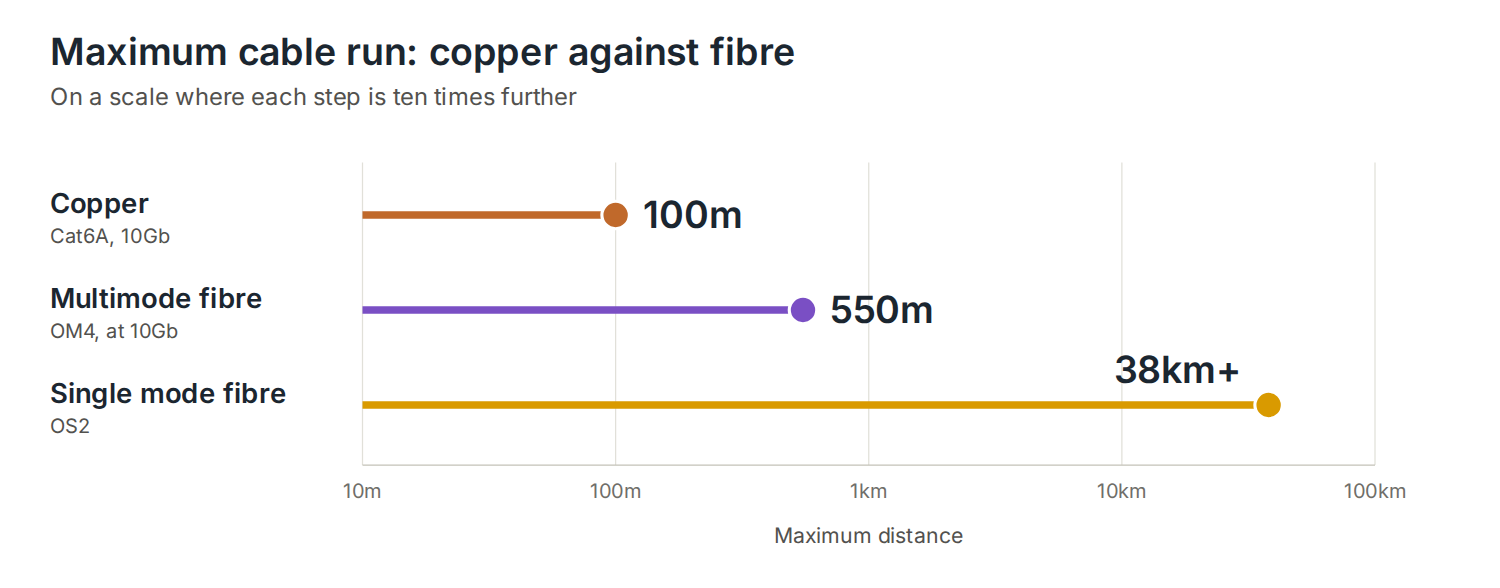
Fibre vs copper: side-by-side
| Copper (Cat6A) | Multimode Fibre (OM4) | Single Mode Fibre (OS2) | |
|---|---|---|---|
| Max distance | 100m | 550m at 10Gb | Up to 38km+ |
| Max speed (typical) | 10Gb | 100Gb | 100Gb+ |
| PoE capable | Yes | No | No |
| EMI resistance | Moderate (shielded) | Full immunity | Full immunity |
| Installation cost | Lower | Higher | Higher |
| Future-proof | Good to Cat8 | Strong | Excellent |
View our range of bulk data cables: Copper Cable–Fibre Optic Cable
How most good installations are actually structured
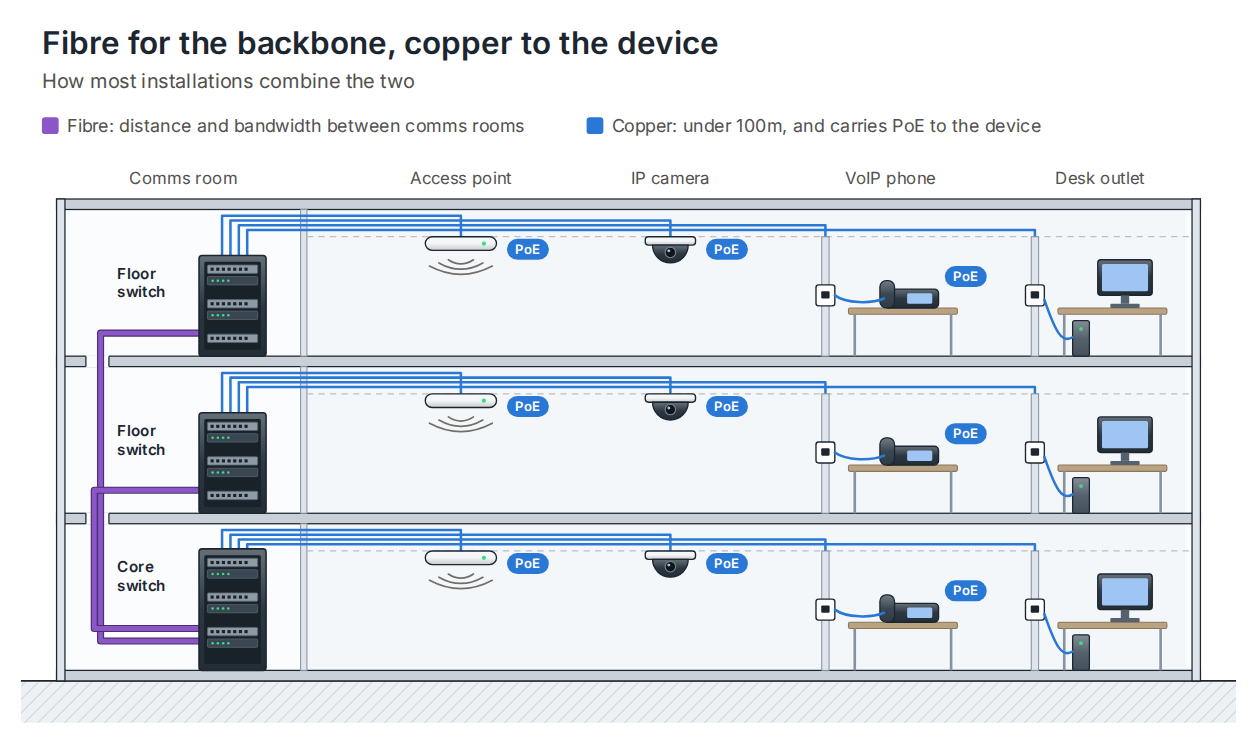
The fibre-vs-copper question is often framed as a binary choice. In practice, the two work together — and a well-designed installation uses each where it performs best.
The most common architecture runs fibre as the backbone: from the main comms room to floor-level distribution switches or satellite comms cabinets. These are the longer runs — between floors, across buildings, or over distances that copper can’t cover. From those distribution points, copper fans out to desks, meeting rooms, access points, and cameras, keeping every individual run well within the 100m limit and preserving PoE capability at the device end.
This isn’t a compromise — it’s the intended design. Fibre handles distance and bandwidth. Copper handles the last leg and device power. The result is a network with a high-capacity backbone, reliable device-level connectivity, and an infrastructure that doesn’t need to be ripped out when equipment is upgraded.
A note on future-proofing
One of fibre’s strongest arguments is longevity. The physical cable doesn’t become obsolete — the electronics on each end do. Install OM4 or OM5 multimode fibre today, and you can move from 10Gb to 40Gb to 100Gb by swapping transceivers, not pulling new cable. The infrastructure investment holds its value.
With copper, moving up a generation typically means new cable. Cat6 to Cat6A, or Cat6A to Cat8 — each step involves a full re-cable of the affected areas. That isn’t always a problem on smaller sites, but on larger projects it’s worth factoring into the total cost of ownership before specifying the cheapest copper option available.
Frequently asked questions
Can I mix fibre and copper on the same network?
Yes — and most commercial installations do. Media converters or SFP ports on switches allow fibre and copper segments to connect seamlessly. The network treats them as a single infrastructure.
Is fibre more expensive than copper?
The cable itself is comparable in cost per metre at higher grades. The difference is in termination — fibre requires specialist tools and training, which adds to installation cost. For short runs, copper is typically cheaper end-to-end. For long runs or high-bandwidth applications, fibre’s total cost of ownership is often lower when you factor in the electronics saved and the reduced likelihood of a re-cable.
What fibre type should I specify for a new installation?
For most commercial buildings, OM4 multimode is the practical choice — it supports 10Gb over 400m and 100Gb over shorter distances, which covers the vast majority of backbone requirements. OM5 adds support for wideband multimode transmission (WBMMF) and is worth considering on larger or more demanding sites. Single mode (OS2) is the specification for inter-building or long-distance runs.
Does the UK copper switch-off affect internal cabling?
No. The copper switch-off refers to BT Openreach retiring the old PSTN — the public telephone network that delivered landline calls and ADSL broadband. Your internal Cat5e or Cat6 Ethernet cabling is unaffected. The switch-off only impacts services delivered over the public copper network: traditional phone lines, ISDN, and older broadband connections.
Summary
Copper remains the right choice for short runs, PoE-powered devices, and cost-sensitive projects where distances are manageable. Fibre is the right choice for long runs, high-bandwidth backbones, EMI-affected environments, and installations where the physical infrastructure needs to outlast several technology cycles.
For most commercial and industrial sites, the answer is both — fibre for the backbone, copper for the edge. Getting that balance right at the design stage makes every other decision easier.
If you’re planning a cabling installation and want clear advice on the right specification for your site, get in touch with the DTECH team — we work with installers, system integrators, and IT teams across the UK, Europe, and the Middle East.