If you’re specifying data cabling for a new installation or an upgrade, the choice between Cat5e, Cat6, and Cat6A comes up on almost every project. The names suggest a simple progression — newer is better — but the practical differences between them matter more than the version numbers imply, and choosing the wrong category for your application can create performance problems that are expensive to fix after the fact.
This guide explains what each standard actually delivers, where the meaningful differences lie, and which cable is the right specification for different types of installation.
What is Cat5e?
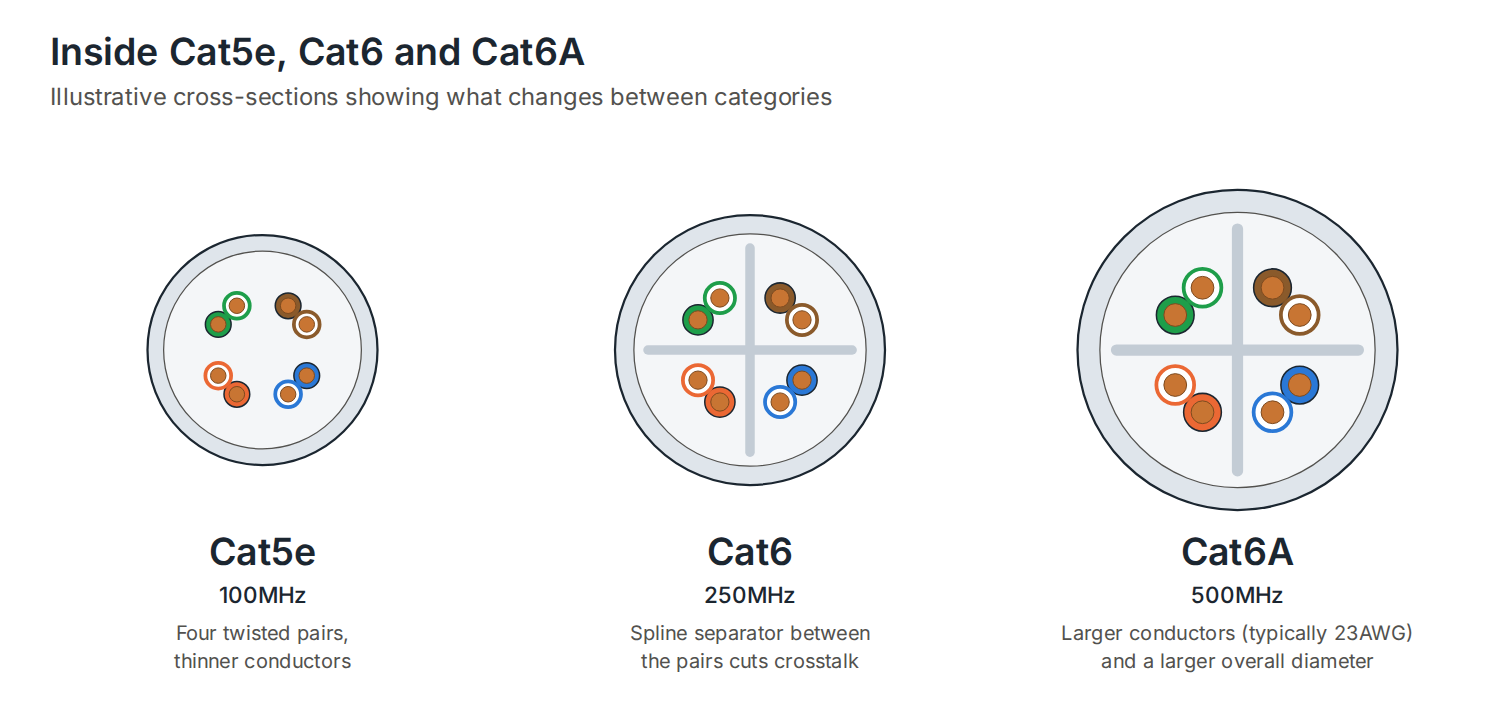
Cat5e — the ‘e’ stands for enhanced — has been the baseline for Ethernet cabling since the early 2000s. It operates at up to 100MHz and supports 1 Gigabit Ethernet over the full 100m channel length. For a long time, that was more than adequate for most office and commercial applications.
Cat5e is still found in large quantities in existing installations, but it is no longer recommended for new work. The reasons are straightforward:
- 1Gb is increasingly a bottleneck in modern networks carrying cloud traffic, video conferencing, and high-density wireless backhaul
- It has no headroom for 10 Gigabit Ethernet at any practical distance
- PoE+ and PoE++ performance is less reliable over Cat5e at longer runs due to higher resistance in the thinner conductors
- The cost saving over Cat6 is negligible — typically pennies per metre — making it hard to justify on any new installation
If you are maintaining or extending an existing Cat5e network, it remains serviceable for 1Gb applications. For anything new, the specification should start at Cat6 as a minimum.
What is Cat6?
Cat6 doubled the bandwidth of Cat5e, operating at 250MHz, and introduced tighter manufacturing tolerances and a spline separator between the four twisted pairs to reduce crosstalk. It supports 1Gb over the full 100m channel and 10 Gigabit Ethernet over shorter distances — the IEEE standard specifies 10GBase-T up to 55m on Cat6.
In practice, that 55m limit for 10Gb is where Cat6 runs into trouble on larger sites. Comms room to desk runs in multi-storey buildings, open-plan offices, or any site where the patch panel isn’t close to the work area can easily exceed 55m once you account for cable routing through ceiling voids, risers, and containment. At that point, the cable degrades to 1Gb — which defeats the purpose of specifying it for 10Gb in the first place.
Standard Cat6 is widely used and widely misunderstood. Many installations are sold as “10Gb-ready” on the basis of Cat6 cabling, when in reality only a fraction of the runs are short enough to actually deliver 10Gb. It’s worth being clear-eyed about this when reviewing any cabling specification.
What is Cat6A?
Cat6A — Augmented Category 6 — was developed specifically to address the distance limitation of Cat6 at 10Gb. It operates at 500MHz and supports 10 Gigabit Ethernet over the full 100m channel length, with no derating at longer runs. That is the fundamental difference, and for most commercial installations it’s the one that matters most.
Beyond the headline numbers, Cat6A brings several other practical advantages:
- Larger conductor diameter (typically 23 AWG vs 24 AWG for Cat6) reduces resistance and heat buildup in PoE deployments
- More robust alien crosstalk (AXT) rejection, which matters in high-density cable bundles
- Better suited to PoE++ (802.3bt) Type 4 deployments at full 90W across the complete cable run
- Accepted as the cabling standard for 10GBase-T without distance caveats
The trade-off is a larger overall cable diameter and slightly higher material cost. Neither is a meaningful objection on most commercial projects — the labour cost of installation dwarfs the cable cost difference, and a cable infrastructure that genuinely delivers what it promises is worth more than one that only does so on shorter runs.
Why the standard isn’t always the whole story
Here’s something that doesn’t get discussed enough: not all Cat6 cable is equal, and the category rating is a minimum standard, not a ceiling.
The IEEE Cat6 specification requires 10GBase-T performance to 55m. That’s the bar a cable has to clear to carry the Cat6 label. What it doesn’t tell you is how much headroom a particular cable has beyond that minimum — and headroom matters, because real-world installations are never as clean as a test environment. Connector quality, termination technique, cable routing, and interference all eat into performance margins.
DTECH’s Cat6 cable is built to perform significantly beyond the standard minimum. It is rated for 10GBase-T to 90 metres at 500MHz — the same frequency rating as Cat6A, and a 35-metre improvement on the standard Cat6 distance limit for 10Gb. In practical terms, that means the majority of runs on a typical commercial site will deliver genuine 10Gb performance, not just runs under 55m.
For installations where Cat6A is over-specified — smaller sites, shorter average runs, or projects with tighter budgets — DTECH Cat6 bridges that gap. You get 10Gb headroom across almost all practical run lengths, with the thinner profile and lower cost of standard Cat6 rather than the bulkier Cat6A construction.
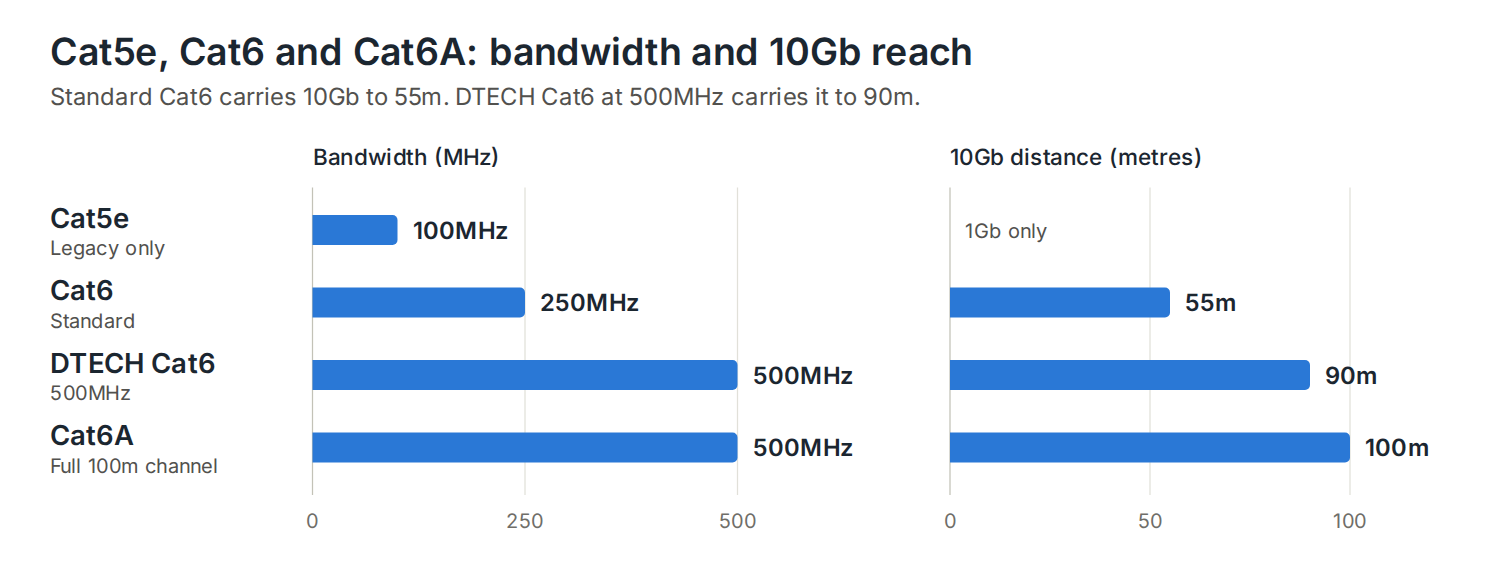
Cat5e vs Cat6 vs Cat6A: side-by-side
| Cat5e | Cat6 (standard) | DTECH Cat6 | Cat6A | |
|---|---|---|---|---|
| Bandwidth | 100MHz | 250MHz | 500MHz | 500MHz |
| Max speed | 1Gb | 10Gb | 10Gb | 10Gb |
| 10Gb distance | — | 55m | 90m | 100m |
| PoE++ ready | No | Marginal | Yes | Yes |
| Cable diameter | Slim | Medium | Medium | Larger |
| Best for | Legacy only | Short runs | Most commercial sites | Full 100m 10Gb runs |
View our range of bulk data cables: Bulk copper cable·AV-ready data cable
Which should you specify?
The right choice depends on the site and the budget, but here is a practical guide:
- Cat5e — only for like-for-like replacement in an existing Cat5e installation. Not recommended for any new work.
- Standard Cat6 — acceptable where all runs are confidently under 50m and 10Gb is not a current requirement. A diminishing use case on modern commercial sites.
- DTECH Cat6 (500MHz, 10GBase-T to 90m) — the practical choice for most commercial installations. Delivers genuine 10Gb performance across the vast majority of real-world run lengths, with a slimmer profile than Cat6A and better value on mid-size projects.
- Cat6A — the correct specification where every run must deliver 10Gb to the full 100m, for high-density PoE++ deployments, or where the installation needs to meet Cat6A certification for contractual or compliance reasons.
Frequently asked questions
Is Cat6 backward compatible with Cat5e equipment?
Yes. All copper Ethernet categories are backward compatible. A Cat6 cable connected to a 1Gb switch will operate at 1Gb — the cable simply won’t be the limiting factor. You can mix categories within a network without compatibility issues, though the overall link performance will be governed by the lowest-rated component in the channel.
Do I need Cat6A for PoE++?
Cat6A is the recommended standard for PoE++ (802.3bt) Type 4 deployments at 90W, primarily because its larger conductor diameter reduces resistance and heat buildup at high power levels. DTECH Cat6, rated to 500MHz, handles PoE++ reliably across most practical run lengths. For very long runs at full 90W, Cat6A remains the safest specification.
Can I mix Cat5e and Cat6 in the same installation?
Physically, yes. Practically, it creates a cabling infrastructure where performance varies by run — some links capable of 10Gb, others limited to 1Gb — which complicates network planning and any future upgrades. On new installations, standardising on a single category throughout makes the infrastructure predictable and easier to certify.
What does 500MHz mean for Cat6 cable?
MHz refers to the bandwidth of the cable — how much frequency range it can carry reliably. The standard Cat6 specification is 250MHz. A Cat6 cable rated to 500MHz — like DTECH’s — meets the same frequency performance as Cat6A, which is why it can support 10GBase-T to 90m rather than the standard 55m limit. It’s the clearest indicator that a cable is performing well above the minimum category standard.
Summary
Cat5e had its day and is no longer the right choice for new installations. Standard Cat6 is widely specified but frequently misunderstood — its 55m limit for 10Gb is a real constraint that affects more installations than people realise. Cat6A solves that completely but comes with a larger physical footprint and higher cost.
DTECH’s Cat6, rated to 500MHz and 10GBase-T performance to 90m, sits in a position that standard Cat6 doesn’t occupy — genuinely capable of 10Gb across almost all practical commercial run lengths, without the bulk or cost of Cat6A. For most mid-size commercial installations, it’s the specification that makes most sense.
If you’re not sure which category is right for your project, the answer usually comes down to your longest runs and your PoE requirements. Get both of those figures and the decision makes itself.
If you’d like advice on specifying the right cable for your installation, get in touch with the DTECH team — we work with installers, system integrators, and IT teams across the UK, Europe, and the Middle East.