Most buildings end up with more than one grade of fibre. A backbone goes in as OM3, an extension goes in as OM4, and somewhere in the comms room there’s a run of orange OM1 nobody wants to touch. So the question comes up on almost every job: can these be connected?
Some can and some can’t. This guide explains which fibre grades work together, what a mixed link costs you in reach, and the difference between OS1 and OS2 singlemode.
Core size decides what can be connected
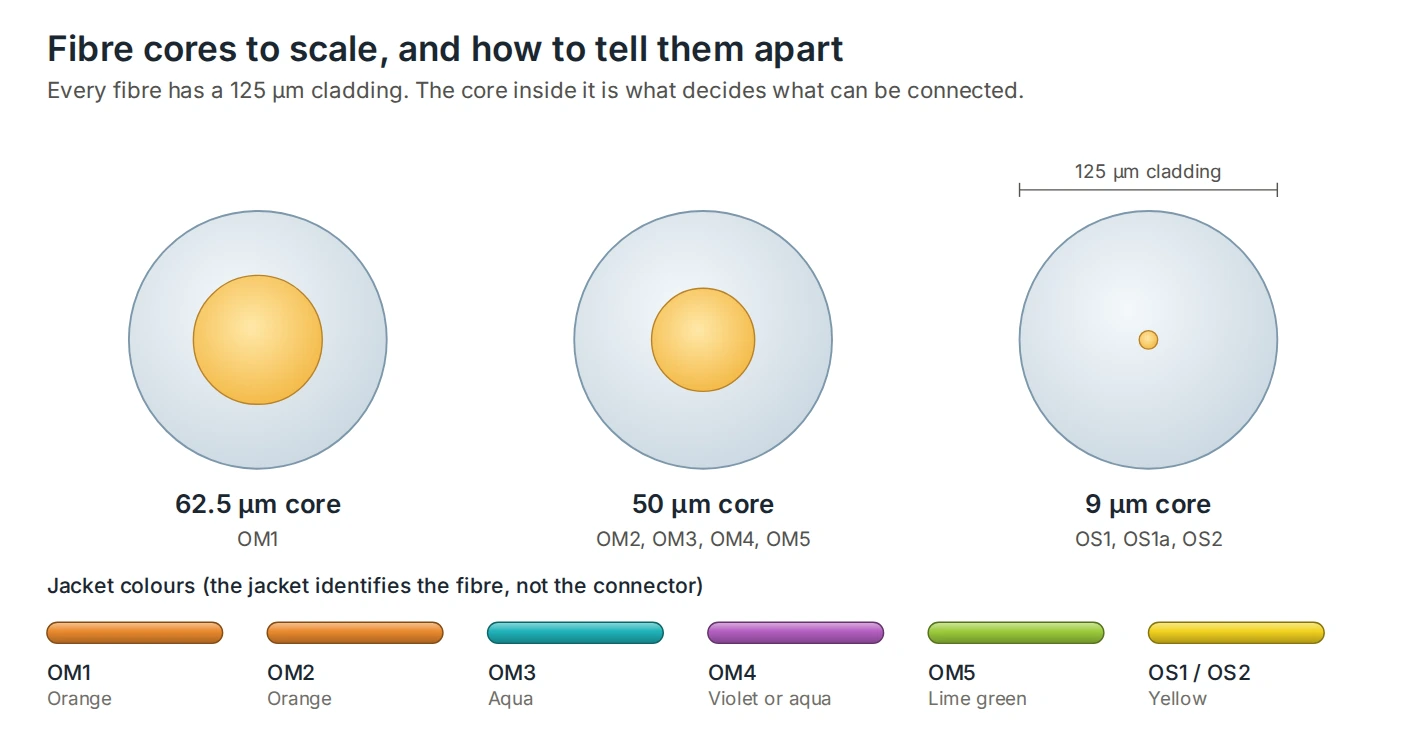
Every fibre has a 125 µm cladding, which is why all the grades fit the same connectors. What differs is the core, the part that carries the light. OM1 has a 62.5 µm core, OM2 to OM5 have a 50 µm core, and singlemode has a core of about 9 µm.
Fibres with the same core size can be joined with little extra loss. The grade within that core size, OM2, OM3, OM4 or OM5, decides how much bandwidth the fibre carries, and so how far it reaches at a given speed. Single mode vs multimode fibre explains the grades in more detail.
The jacket colour is the quickest guide: orange for OM1 and OM2, aqua for OM3, violet or aqua for OM4, lime green for OM5 and yellow for singlemode. The jacket identifies the fibre, not the connector colour, since beige connectors are used on OM3 and OM4 leads as well as older multimode. Where OM3 and OM4 are both aqua, the printed legend on the jacket confirms the grade.
Can you mix OM3 and OM4?
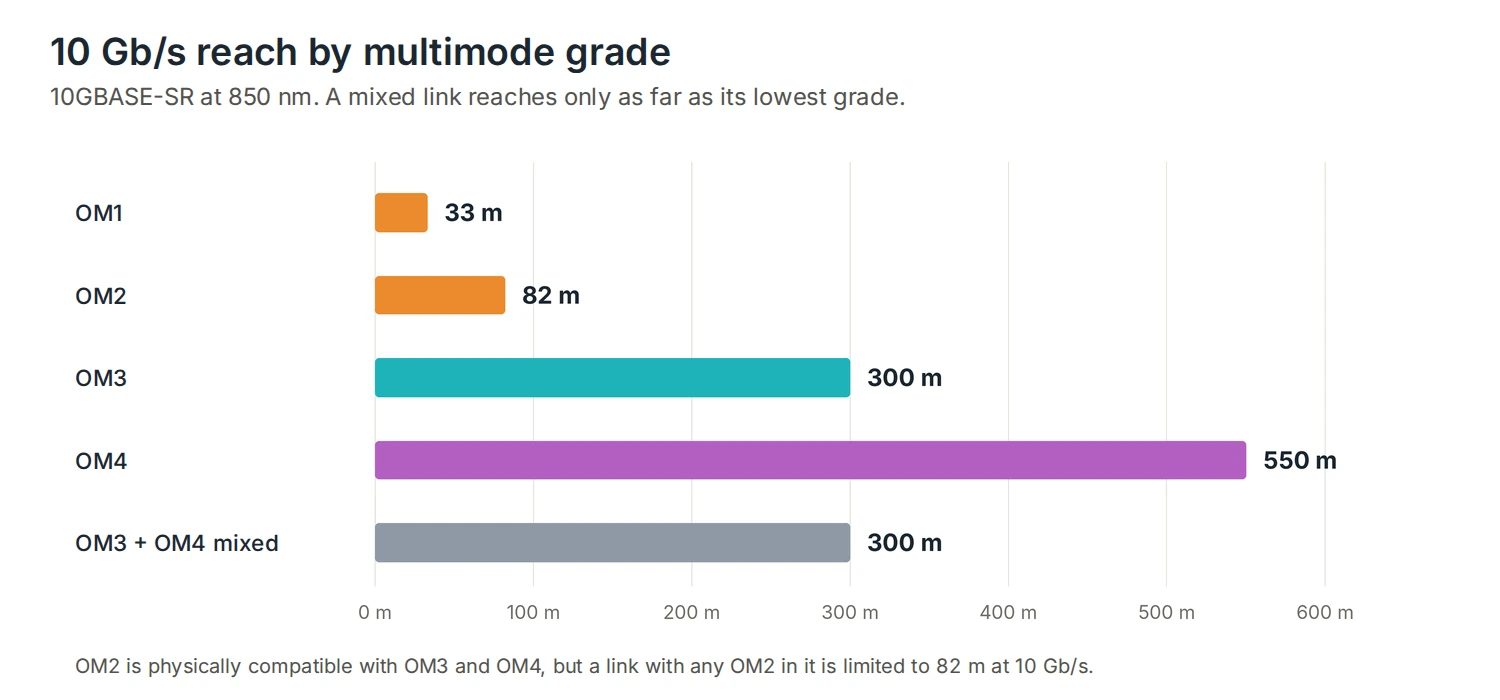
Yes. OM3 and OM4 have the same 50 µm core and are both laser-optimised for the VCSEL transmitters used at 10 Gb/s and above. They connect without any adaptor and with normal connector loss. The catch is reach: a link that includes OM3 can only be relied on to OM3 distances.
| Application | OM3 | OM4 | OM3 and OM4 mixed |
|---|---|---|---|
| 10GBASE-SR (10 Gb/s) | 300 m | 550 m | 300 m |
| 40GBASE-SR4 (40 Gb/s) | 100 m | 150 m | 100 m |
| 100GBASE-SR4 (100 Gb/s) | 70 m | 100 m | 70 m |
On most building links, which are well inside 300 m, that makes no practical difference. It matters on longer runs and at 40 and 100 Gb/s, where OM4’s extra reach is the reason to specify it.
Patch leads should match the cabling. Using OM4 patch leads on OM4 cabling keeps the full performance you paid for. An OM3 lead plugged into an OM4 link will usually work, but the channel can then only be guaranteed to OM3.
Is OM2 compatible with OM3 and OM4?
Physically, yes. OM2 has the same 50 µm core, so it connects to OM3 and OM4 with normal connector loss. But OM2 isn’t laser-optimised. At 10 Gb/s its reach is only 82 m, and any link with OM2 in it is limited to that.
At 1 Gb/s the picture is different. 1000BASE-SX runs 550 m on OM2, the same distance the standard gives for OM3, so an OM2 backbone carrying gigabit links is fine. It becomes a problem only when the link is upgraded to 10 Gb/s.
Can you connect OM1 to OM3 or OM4?
Avoid it. OM1’s 62.5 µm core is larger than the 50 µm core of the other grades. Light going from the larger core into the smaller one spills outside it and is lost. The Fiber Optic Association gives 0.9 to 1.6 dB of extra loss for each 62.5-to-50 joint, and measured more than 3 dB with an LED source. The loss is much lower in the other direction, but a duplex link carries light both ways, so one direction always suffers.
That’s often enough to break a loss budget on its own. If OM1 is still in service, keep it as a separate system with OM1 patch leads, and replace it with OM4 when the link needs upgrading.
Which grades can be connected?
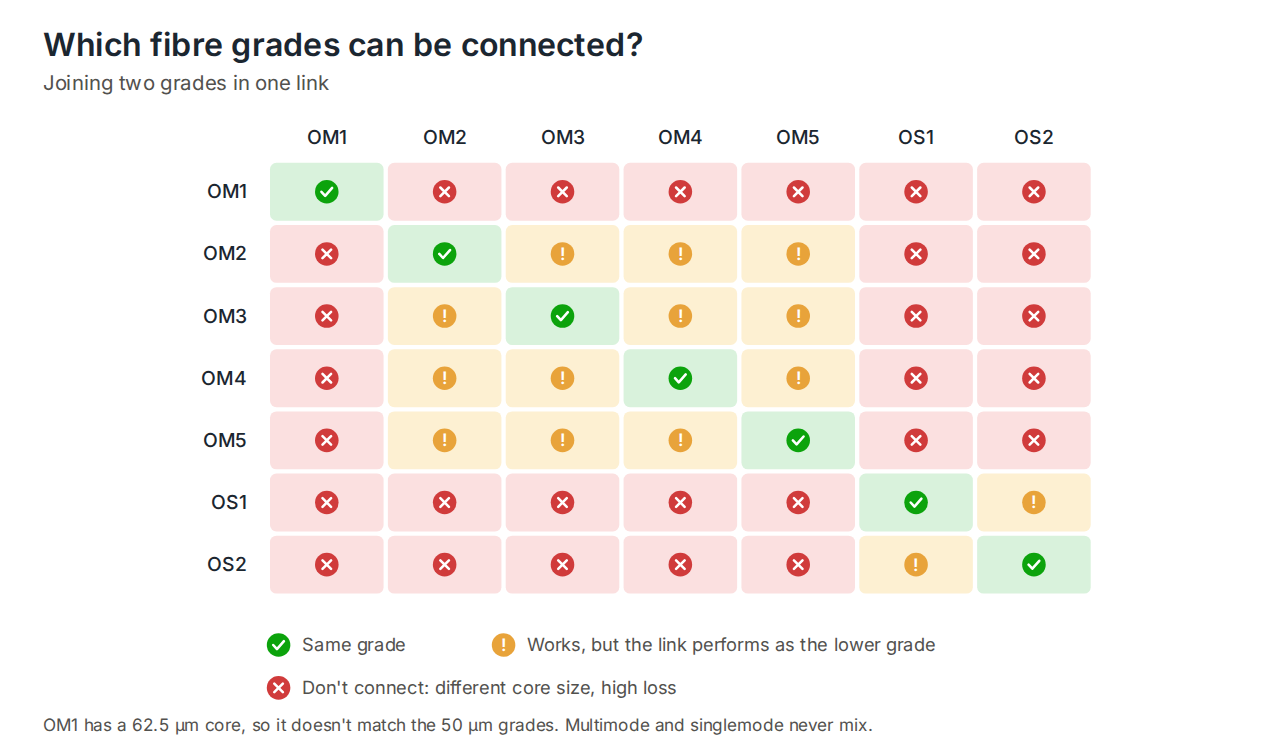
OM4 and OM5 also connect, since they share a core and both work at 850 nm. OM5 adds bandwidth at longer wavelengths for shortwave wavelength division multiplexing; OM4 vs OM5 covers when that matters.
Never mix multimode and singlemode
A 50 µm multimode core and a 9 µm singlemode core can’t be joined usefully. Light from multimode into singlemode loses most of its power, and the transceivers at each end are built for one fibre type or the other. Multimode optics run at 850 nm on multimode fibre; singlemode optics run at 1310 nm or 1550 nm on singlemode fibre. Check that the fibre, the patch leads and the optics all match.
OS1 vs OS2: what’s the difference?
OS1 and OS2 are both singlemode, with the same 9 µm core, and both use ITU-T G.652 fibre. The difference is how much loss the cable is specified to have.
| Grade | Maximum attenuation | Specified at | Water peak |
|---|---|---|---|
| OS1 | 1.0 dB/km | 1310 and 1550 nm | Not specified (G.652.A or B) |
| OS1a | 1.0 dB/km | 1310, 1383 and 1550 nm | Low water peak |
| OS2 | 0.4 dB/km | 1310, 1383 and 1550 nm | Low water peak (G.652.D) |
OS1 was traditionally tight buffered indoor cable and OS2 loose tube outdoor cable, but that link has gone. Construction isn’t part of the specification, and OS2 is now made in both. DTECH OS2 tight buffered cable uses G.657.A1 bend-insensitive fibre, which is fully compatible with G.652.D fibre and connects to existing singlemode without any loss penalty beyond normal joints.
OS1 and OS2 can be connected. Treat the OS1 part of a link at 1.0 dB/km in the loss budget: on a 2 km run, that’s 2.0 dB for OS1 against 0.8 dB for OS2. For new singlemode, specify OS2.
Getting mixed fibre right
- Check what’s installed. Read the printed legend on the jacket, not just its colour, and check old test results for the fibre type.
- Match the patch leads. Use leads of the same grade as the cabling at both ends.
- Design to the lowest grade. A mixed link reaches only as far as its weakest section allows.
- Test after any change. Measure insertion loss end to end; insertion loss and return loss explained covers what the figures mean.
- Upgrade old backbones whole. When an OM1 or OM2 link needs more speed, replace it with OM4 or OS2 rather than extending it. Pre-terminated fibre makes that a quick swap.
Frequently asked questions
Can I use an OM3 patch lead with OM4 cable?
It will usually work, but the channel can then only be guaranteed to OM3 performance. Match the patch leads to the cabling to keep OM4’s full reach.
Is OM2 compatible with OM3?
Yes physically, as both have a 50 µm core. At 1 Gb/s both reach 550 m, but at 10 Gb/s a link containing OM2 is limited to 82 m.
Can OM1 be connected to OM4?
It isn’t recommended. The 62.5 µm to 50 µm mismatch adds 0.9 to 1.6 dB or more of loss at each joint in one direction, which can break the loss budget.
What is the difference between OS1 and OS2?
Attenuation. OS1 is specified at up to 1.0 dB/km and OS2 at up to 0.4 dB/km, with OS2 also specified at 1383 nm for low water peak. Both have the same 9 µm core and can be connected.
Can singlemode and multimode be connected?
No. The core sizes are too different and the optics are built for one type. Use the same fibre type from end to end.
Summary
Fibres with the same core size can be connected: OM2, OM3, OM4 and OM5 work together, and so do OS1 and OS2, but a mixed link performs as its lowest grade. OM1 doesn’t match the 50 µm grades, and multimode never mixes with singlemode. DTECH supplies OM4 and OS2 cable and patch leads in every grade, so each link can be matched end to end.
If you need help identifying installed fibre or planning an upgrade, get in touch with the DTECH team.