
When fibre optic cabling comes up on a project, the conversation usually moves quickly to OM3, OM4, or OS2. These designations tell you everything about what a cable can actually do — how far it will run, what speeds it will support, and whether it’s the right fit for your application. Understanding the difference between them is straightforward once the logic behind the naming system is clear.
This guide explains what multimode and single mode fibre are, what OM3, OM4, and OS2 mean in practical terms, and which you should be specifying for different types of installation.
Multimode vs single mode: the fundamental difference
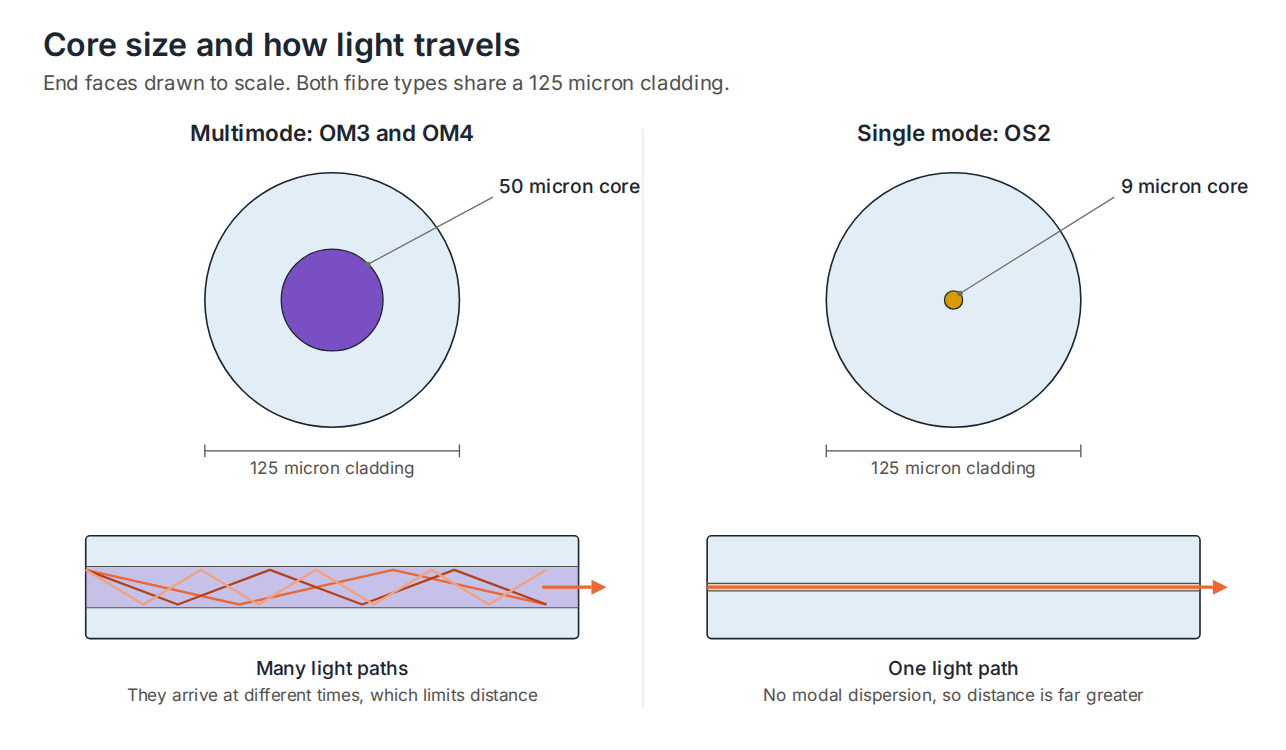
All fibre optic cable works by transmitting data as pulses of light through a glass core. The difference between multimode and single mode comes down to the diameter of that core and, as a result, how light travels through it.
Multimode fibre has a larger core — typically 50 microns in diameter. That larger core allows multiple rays of light to travel simultaneously through the fibre, each taking a slightly different path. This is the source of its main limitation: over longer distances, those different light paths arrive at slightly different times, causing the signal to spread and degrade. This effect is called modal dispersion, and it is what puts a practical ceiling on how far multimode fibre can run at a given speed.
Single mode fibre has a much smaller core — 9 microns, roughly a fifth the size of multimode. That narrow core allows only a single ray of light to travel through it, eliminating modal dispersion entirely. Without that degradation mechanism, single mode fibre can transmit data over vastly greater distances with no meaningful signal loss. The trade-off is that the precision required to manufacture and terminate such a small core makes single mode equipment — particularly the transceivers — more expensive.
In practical terms: multimode is the right choice for runs within a building or campus where distances are measured in hundreds of metres. Single mode is the right choice when distances are measured in kilometres — inter-site links, long campus backbones, or connections to a public fibre network.
What the OM and OS designations mean
OM stands for Optical Multimode. OS stands for Optical Single mode. The number that follows is simply a generation rating — higher numbers indicate better performance. Both systems are defined by ISO/IEC 11801, the international standard for structured cabling.
The OM and OS ratings are not marketing labels. They define specific, measurable performance characteristics — primarily bandwidth and attenuation — that a cable must meet to carry the designation. When a cable is specified as OM4, it means it has been manufactured and tested to meet defined bandwidth requirements that support the distances and speeds the standard specifies.
OM3 multimode fibre
OM3 was the multimode standard that brought 10 Gigabit Ethernet into practical reach for building-level installations. It uses a 50-micron laser-optimised core — designed specifically to work with the VCSEL (Vertical-Cavity Surface-Emitting Laser) light sources used in 10Gb and higher transceivers — and has a modal bandwidth of 2,000 MHz/km.
OM3 performance at key speeds:
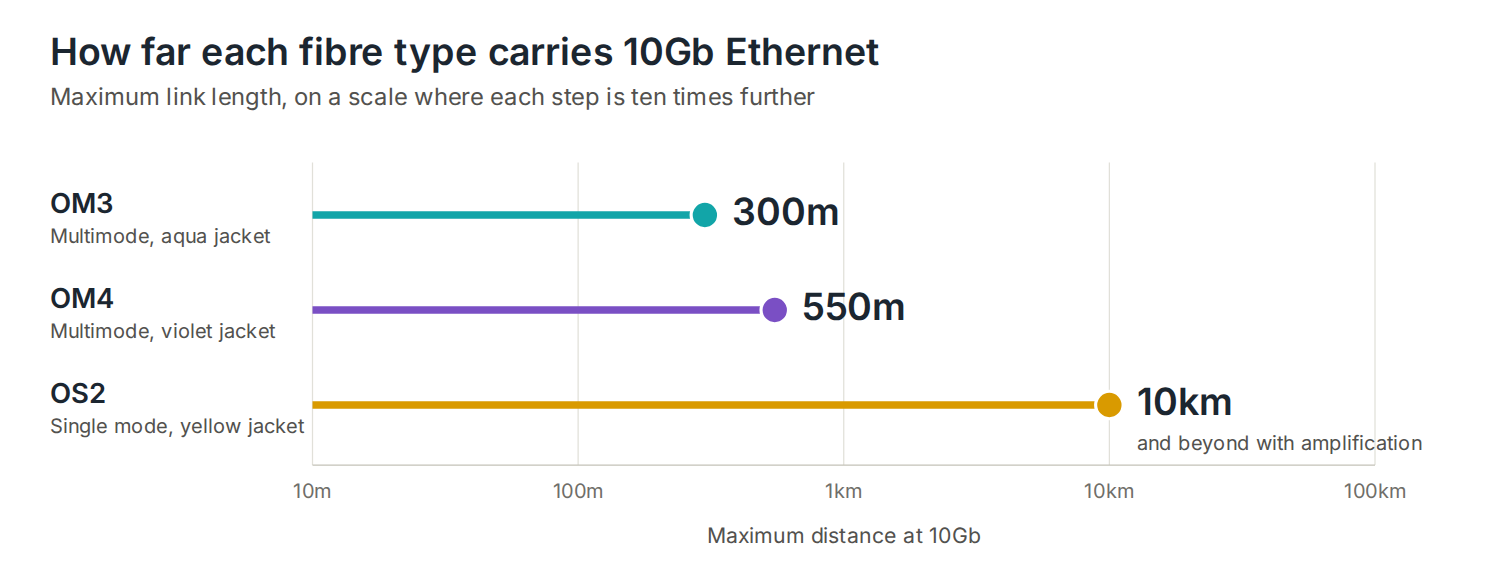
- 10Gb Ethernet (10GBASE-SR) — up to 300m
- 40Gb Ethernet — up to 100m
- 100Gb Ethernet — up to 100m
OM3 remains a valid choice for smaller buildings and installations where 10Gb backbone runs are all under 300m — which covers the majority of single-site commercial deployments. It is widely available, well understood, and priced competitively.
Where OM3 starts to fall short is on larger sites, multi-building campuses, or any installation where backbone runs push beyond 300m. At that point, OM4 is the correct specification.
OM4 multimode fibre
OM4 is an enhanced version of OM3, using the same 50-micron laser-optimised core construction but manufactured to tighter tolerances that deliver a higher modal bandwidth of 4,700 MHz/km. That improved bandwidth translates directly into longer supported distances at the same speeds.
OM4 performance at key speeds:
- 10Gb Ethernet (10GBASE-SR) — up to 550m
- 40Gb Ethernet — up to 150m
- 100Gb Ethernet — up to 100m
The jump from 300m to 550m at 10Gb is the headline difference over OM3, and it matters on larger sites. A distribution switch serving a wing of a building 350m from the comms room is straightforward on OM4 and would require a workaround on OM3. On multi-storey buildings where risers add significant cable length, that headroom is frequently the deciding factor.
OM4 is also the correct specification for 40Gb and 100Gb backbone links where distance matters — it extends the supported reach for both compared to OM3. For any new installation where 40Gb or 100Gb is a current or near-future requirement, OM4 is the sensible minimum.
OM3 and OM4 are physically compatible — they share the same connector types and can be connected to each other. However, when mixed in a link, the performance of the lower-rated cable governs the whole run. Mixing them is not recommended in a new installation.
DTECH’s OM4 fibre is laser-optimised and bend-insensitive, manufactured to perform reliably in the tight routing conditions found in comms cabinets, riser pathways, and high-density patch environments — without the signal degradation that standard multimode fibre can suffer when cables are bundled or routed around corners.
OS2 single mode fibre
OS2 is the current standard for single mode fibre and the one specified for virtually all new single mode installations. It uses a 9-micron core with a maximum attenuation of 0.4 dB/km — significantly lower than older OS1 cable at 1.0 dB/km — which is what allows it to transmit reliably over extraordinary distances.
OS2 performance at key speeds:
- 10Gb Ethernet — up to 10km (standard transceivers) and beyond with amplification
- 40Gb Ethernet — up to 10km
- 100Gb Ethernet — up to 10km (LR4 transceivers) or 40km (ER4)
- Maximum theoretical reach — up to 200km with amplification
For most commercial installations, OS2 comes into play in two specific situations. The first is inter-building links — connecting separate buildings on a site, or linking sites across a town or city. The second is connections to a public or carrier fibre network, where the cable runs from the building to an exchange or distribution point.
OS2 is a loose-tube construction, meaning the fibre sits within semi-rigid protective tubes rather than being tightly buffered. This makes it well suited to outdoor and underground installations where the cable needs to accommodate temperature fluctuation and mechanical stress without that stress being transferred directly to the fibre.
DTECH’s OS2 single mode fibre is manufactured to the ITU-T G.657.A1 bend-insensitive standard, with a minimum bend radius of 10mm compared to 30mm on standard G.652.D fibre. It is fully G.652.D compliant — meaning it splices and connects with existing single mode infrastructure without issue — while giving installers significantly more flexibility in tight spaces, confined cabinets, and complex cable routes.
The transceivers required for single mode are more expensive than multimode equivalents, which is the main cost consideration when comparing OS2 to OM4 for borderline applications. For distances under 500m, OM4 is almost always the more cost-effective choice. Above 500m — and certainly above 1km — OS2 becomes the correct specification regardless of cost, because multimode simply cannot cover the distance reliably.
OM3 vs OM4 vs OS2: side-by-side
| OM3 | OM4 | OS2 | |
|---|---|---|---|
| Type | Multimode | Multimode | Single mode |
| Core diameter | 50 micron | 50 micron | 9 micron |
| Jacket colour | Aqua | Violet | Yellow |
| Modal bandwidth | 2,000 MHz/km | 4,700 MHz/km | Effectively unlimited |
| 10Gb max distance | 300m | 550m | 10km+ |
| 40Gb max distance | 100m | 150m | 10km+ |
| 100Gb max distance | 100m | 100m | 10–40km |
| Transceiver cost | Low | Low | Higher |
| Best for | Building backbones under 300m | Building and campus backbones | Inter-building and long-distance |
View our range of fibre optic cables: Bulk fibre optic cable·Pre-terminated fibre optic cable
Which should you specify?
The decision is almost always driven by distance. Use this as a starting point:
- OM3 — suitable for backbone runs under 300m where 10Gb is the maximum speed requirement. A cost-effective choice for smaller single-site installations and where existing OM3 infrastructure is already in place.
- OM4 — the recommended standard for new multimode installations. Covers the vast majority of building and campus backbone requirements, supports 40Gb and 100Gb with meaningful distance headroom, and future-proofs the physical infrastructure against the next generation of switching equipment.
- OS2 — the correct specification for any run over 500m, all inter-building links, underground or external routes, and any connection to a carrier or public fibre network. Also the right choice where very long-term infrastructure investment is the priority, as single mode fibre has no practical distance ceiling that future electronics will outgrow.
A note on pre-terminated fibre
One of the practical considerations that often gets overlooked when specifying fibre is termination. Unlike copper, fibre optic cable cannot be terminated on site with basic tools — it requires specialist equipment and trained technicians to splice or polish connectors to the standard required for reliable performance.
Pre-terminated fibre assemblies — supplied to length with factory-fitted connectors already tested and certified — remove that dependency entirely. They are particularly useful on time-sensitive installations, in data centres where cleanliness and precision are critical, and on any project where on-site termination would introduce risk. The connectors are fitted under controlled factory conditions, insertion loss is measured and documented, and the assembly arrives on site ready to install.
Frequently asked questions
Can I connect OM3 and OM4 fibre together?
Physically, yes — they use the same connector types and core diameter. However, when connected in the same link, the performance of the lower-rated cable applies to the whole run. A link that mixes OM3 and OM4 will perform to OM3 specification. For new installations, standardising on OM4 throughout is always the cleaner approach.
Can I connect multimode and single mode fibre together?
No. Multimode and single mode fibre are not compatible. The core diameters are completely different — 50 micron versus 9 micron — and the transceivers used with each type operate at different wavelengths. Connecting them will result in severe signal loss. Media converters can be used to bridge a multimode segment to a single mode segment where required, but they introduce cost and a potential point of failure.
How do I identify which type of fibre I have installed?
Jacket colour is the quickest indicator. Aqua typically indicates OM3, with violet for OM4 multimode fibre. Yellow indicates OS1 or OS2 single mode. However, jacket colour is not standardised across all manufacturers and should not be the sole method of identification — the cable print on the jacket itself will state the fibre type, and any structured cabling installation should have a test certificate and schedule of records confirming what is installed where.
What is the difference between OS1 and OS2?
Both are single mode fibre, but OS1 is an older specification with higher attenuation — 1.0 dB/km — and is primarily used for indoor, shorter-distance applications up to around 10km. OS2 has lower attenuation at 0.4 dB/km, supports much longer distances up to 200km, and is the standard for all new single mode installations. If you are specifying single mode fibre for a new project, OS2 is the correct choice in almost every case.
Does the connector type change between OM3, OM4, and OS2?
The connector type — LC, SC, MPO and so on — is independent of the fibre designation. LC duplex is the most common connector in commercial structured cabling for both multimode and single mode. MPO connectors are used for high-density and pre-terminated assemblies, particularly in data centres running 40Gb and 100Gb over parallel optics. The connector specification should be confirmed against your switch and transceiver requirements before ordering.
Summary
OM3 and OM4 are multimode fibre types suited to runs within buildings and campuses — OM3 to 300m at 10Gb, OM4 to 550m. OS2 is single mode fibre for long-distance and inter-building links, with a practical reach measured in kilometres rather than metres. For new installations, OM4 is the recommended multimode specification and OS2 is the standard for all single mode work.
Getting the fibre type right at the design stage means the physical infrastructure won’t be the limiting factor when switching equipment is upgraded. Fibre cable doesn’t become obsolete — the electronics on each end do. Specify the right type once, and it will serve the network through multiple generations of hardware.
If you need help specifying the right fibre for your installation, get in touch with the DTECH team — we supply bulk and pre-terminated fibre optic cable to installers and IT teams across the UK, Europe, and the Middle East.