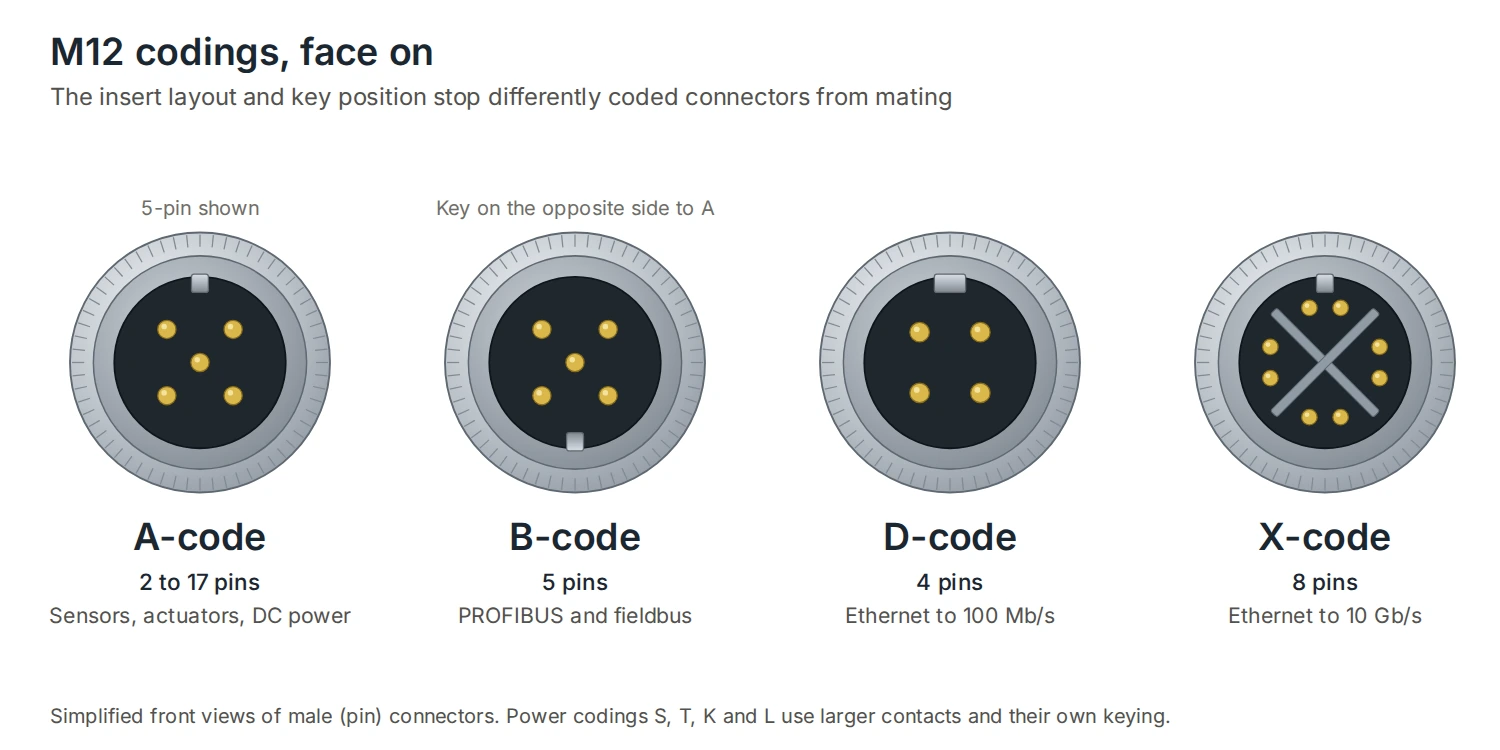
An M12 connector is a circular connector with a 12 mm screw-lock thread, used on sensors, actuators, drives, cameras and industrial Ethernet devices. The letter after it, A, B, D, X and so on, is the coding: the layout of the contacts and the position of the key. Each coding is built for one job, and connectors with different codings physically can’t be mated, so a power connector can never end up in a data port.
This guide is a reference for the M12 codings you’ll meet: what each one is for, how many pins it has, and the D-code and X-code pinouts to RJ45.
M12 codings at a glance
| Coding | Pins | Type | Typical use | Standard |
|---|---|---|---|---|
| A | 2 to 17 (4, 5, 8 and 12 most common) | Signal, DC power | Sensors, actuators, I/O | IEC 61076-2-101 |
| B | 5 | Fieldbus | PROFIBUS DP and other fieldbuses | IEC 61076-2-101 |
| D | 4 | Ethernet to 100 Mb/s | PROFINET, EtherNet/IP, EtherCAT | IEC 61076-2-101 |
| X | 8 | Ethernet to 10 Gb/s | Gigabit PROFINET, GigE Vision cameras | IEC 61076-2-109 |
| S | 2 + PE or 3 + PE | AC power | Single-phase or three-phase AC supply | IEC 61076-2-111 |
| K | Up to 4 + PE | AC power | Single-phase or three-phase AC supply | IEC 61076-2-111 |
| T | 2 to 4 | DC power | DC supply to devices | IEC 61076-2-111 |
| L | Up to 4 + FE | DC power | 24 V distribution, PROFINET power | IEC 61076-2-111 |
The equipment decides the coding. Check the port on the device: it will be marked or listed in the manual as A, B, D, X or one of the power codes, and the cable connector has to match it. There are less common codings too, such as C for AC power, and Y for hybrid connectors that carry data and power together. For industrial Ethernet, DTECH makes ready-made X-code and D-code assemblies.
Signal codings: A and B
A-code is the most widely used M12 coding. It connects sensors and actuators, carries DC power and signals, and comes in versions from 2 to 17 pins, with 4, 5, 8 and 12 pins the most common. The 4-pin version is the standard for proximity sensors and photoelectric sensors, with a wire colour convention used across manufacturers:
| Pin | Wire colour | Function on a typical DC sensor |
|---|---|---|
| 1 | Brown | Supply +24 V DC |
| 2 | White | Second output or diagnostics |
| 3 | Blue | 0 V |
| 4 | Black | Switching output |
B-code has its key on the opposite side to A-code, so the two can’t be confused. It’s used for PROFIBUS DP and other fieldbus networks, with 5 pins.
Data codings: D and X
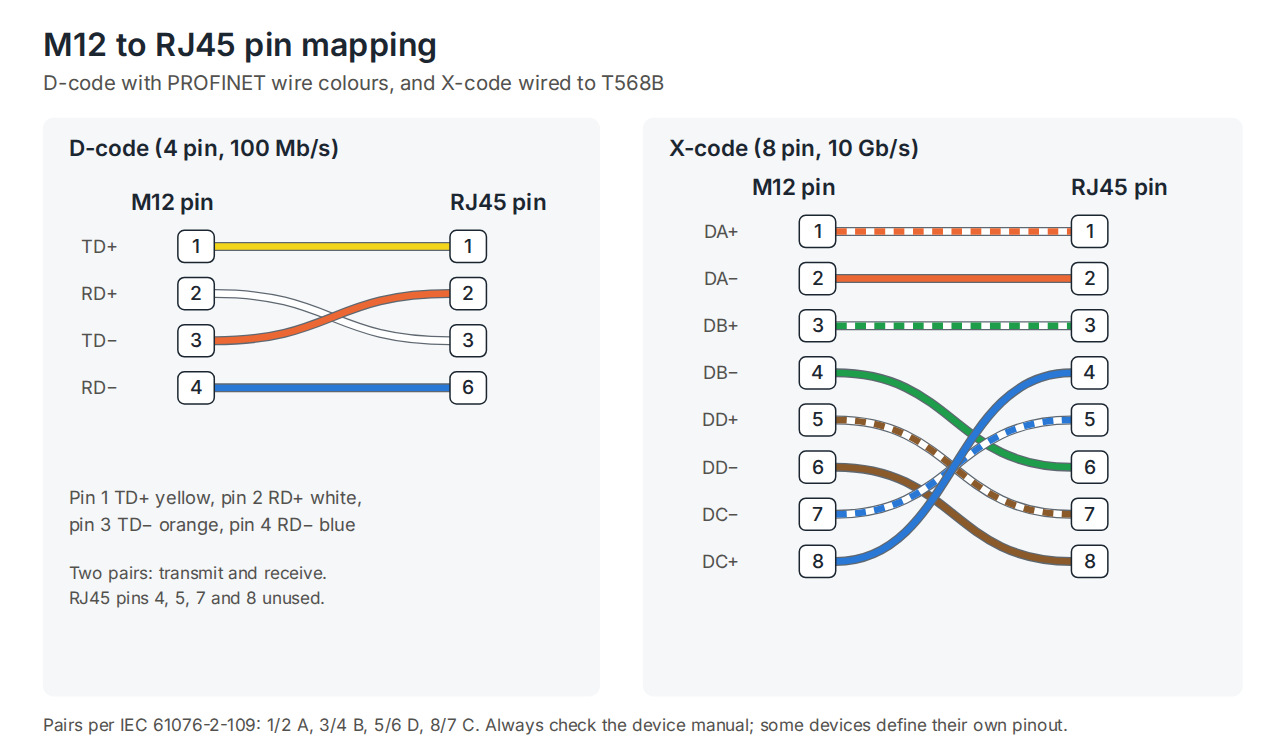
D-code and X-code are the two M12 codings for industrial Ethernet. D-code has 4 pins for two pairs and carries 10/100 Mb/s over Cat5e cable. It’s the long-standing connector for PROFINET, EtherNet/IP and EtherCAT at 100 Mb/s, and most field devices still ship with D-coded ports. X-code has 8 pins for four pairs, separated by a cross-shaped screen, and carries Gigabit and 10 Gigabit Ethernet over Cat6A. M12 X-code vs D-code explains how to choose between them.
D-code pinout
| M12 pin | Signal | PROFINET colour | RJ45 pin |
|---|---|---|---|
| 1 | TD+ (transmit +) | Yellow | 1 |
| 2 | RD+ (receive +) | White | 3 |
| 3 | TD− (transmit −) | Orange | 2 |
| 4 | RD− (receive −) | Blue | 6 |
X-code pinout
| M12 pin | Pair signal | T568B colour | RJ45 pin |
|---|---|---|---|
| 1 | DA+ | White/orange | 1 |
| 2 | DA− | Orange | 2 |
| 3 | DB+ | White/green | 3 |
| 4 | DB− | Green | 6 |
| 5 | DD+ | White/brown | 7 |
| 6 | DD− | Brown | 8 |
| 7 | DC− | White/blue | 5 |
| 8 | DC+ | Blue | 4 |
These follow the pair assignments in IEC 61076-2-101 and 61076-2-109. Some devices define their own pinout, so check the manual when wiring to a device rather than a cable.
DTECH M12 X-code to RJ45 assemblies use Cat6A S/FTP cable with a PUR jacket. DTECH M12 D-code to RJ45 PROFINET cables use Cat5e SF/UTP cable with a PVC jacket. Both come ready-made in straight and angled versions, so there’s no field wiring to get wrong.
Power codings: S, K, T and L
The power codings carry supply, not signals, so they use larger contacts and their own keying. S and K are for AC; T and L are for DC. Ratings vary by manufacturer, but AC versions are rated at around 600 to 630 V and DC versions at up to 63 V, with currents of 12 to 16 A.
- S-code: 2 or 3 contacts plus protective earth, for single-phase or three-phase AC.
- K-code: up to 4 contacts plus protective earth, for single-phase or three-phase AC, including supplies with a neutral.
- T-code: 2 to 4 contacts, for DC supply.
- L-code: up to 4 contacts plus functional earth, widely used to distribute 24 V DC in PROFINET installations.
Because each power coding has unique keying, a power cable can’t be plugged into a data port or a sensor port by mistake.
Male or female?
As a rule, the side that supplies power has the female socket, so live contacts aren’t exposed when it’s unplugged. Sensors usually have male pins and the cable has a female connector. On Ethernet devices the port is usually a female socket and the cable has a male plug. Always check gender as well as coding: two connectors with the same coding and the same gender won’t mate.
Field-wireable connectors and adaptors
Where a ready-made assembly isn’t the right length, field-wireable plugs let you terminate cable on site. The DTECH M12 X-code IDC plug suits Cat6A, and the DTECH M12 D-code screw-terminal plug suits Cat5e. Front, back and panel-mount sockets and M12 to RJ45 adaptors are in the X-code and D-code connector ranges.
Keep the cable jacket in mind too. PUR suits moving and oily applications and PVC suits fixed runs. And remember that the IP rating only applies when the connector is fully mated and tightened; IP ratings explained covers what IP67 and IP68 actually mean.
Frequently asked questions
What does M12 mean?
It refers to the metric 12 mm screw thread that locks the connector. The coding letter after it describes the contact layout and keying.
Can A-code and D-code connectors be connected?
No. Each coding has a different key position, so they can’t be mated. That’s deliberate, to stop sensor, power and data connectors being mixed up.
Can a D-code device connect to an X-code network?
Not directly, because the connectors won’t mate. Use a cable with a D-code connector at one end and an X-code connector at the other, or connect through a switch with the right ports. The link runs at 100 Mb/s.
Which M12 coding is used for PROFINET?
D-code for 100 Mb/s PROFINET, X-code for Gigabit PROFINET, and L-code is widely used for 24 V power distribution.
Which M12 coding is used for Ethernet cameras?
Gigabit and 10 Gigabit machine vision cameras, such as GigE Vision models, use X-code. Older 100 Mb/s cameras may use D-code.
Summary
M12 coding tells you what a connector is for. A-code is for sensors and actuators, B-code for fieldbus, D-code for 100 Mb/s Ethernet, X-code for Gigabit and 10 Gigabit Ethernet, and S, K, T and L for AC and DC power. The device sets the coding, and the keying stops anything else from fitting. DTECH supplies M12 X-code assemblies, D-code assemblies and field-wireable connectors for industrial Ethernet. For the wider range, see industrial connectivity: M12 connectors, assemblies and cable.
If you need help matching M12 connectors and cables to your equipment, get in touch with the DTECH team.