The maximum length of an Ethernet cable run is 100 metres. That figure is easy to quote and easy to get wrong, because it isn’t 100 metres of installation cable. It’s the whole channel, from the switch port to the device, and only 90 metres of it can be the fixed cable in the wall. The rest is patch cords.
This guide explains how the 90 m and 100 m rules work, what makes the real limit shorter, and what to do when a run has to go further.
The channel and the permanent link
ISO/IEC 11801 and TIA-568 split a twisted-pair run into two parts. The permanent link is the fixed cable from the patch panel to the outlet, including the connectors at each end. It can be up to 90 m. The channel is everything between the two active devices: the permanent link plus the patch cord in the cabinet and the cord at the desk. It can be up to 100 m, with no more than 10 m of cords in total.
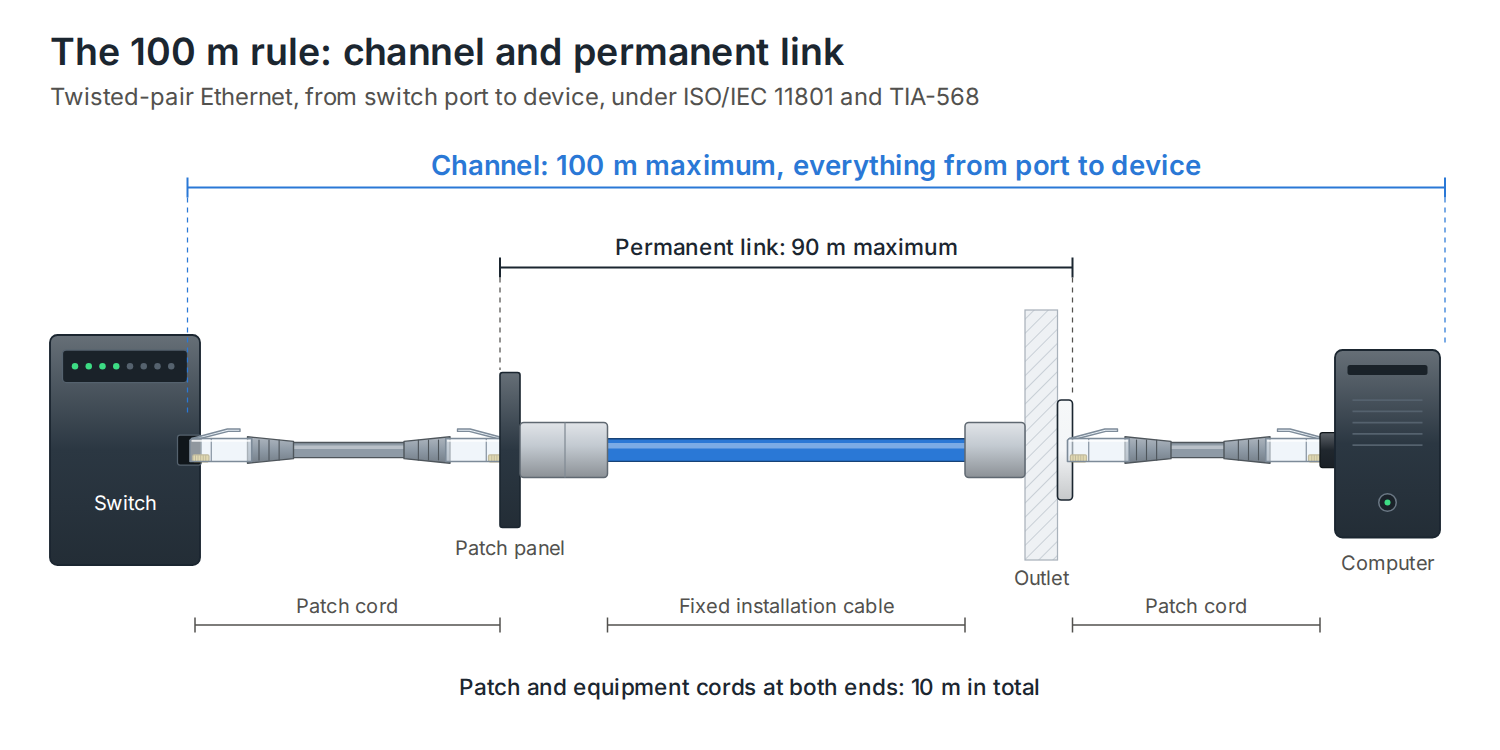
The split matters when the cabling is tested. An installer certifies the permanent link, because that’s the part they install and hand over. The channel is what the network actually uses. How to read a cable test certificate explains the two test types.
Does a better category go further?
No. Every twisted-pair Ethernet standard from 10BASE-T to 10GBASE-T is specified over a 100 m channel. A higher category gives more bandwidth and more headroom, not more distance.
| Application | Cat5e | Cat6 | Cat6A |
|---|---|---|---|
| 1000BASE-T (1 Gb/s) | 100 m | 100 m | 100 m |
| 2.5GBASE-T and 5GBASE-T | 100 m | 100 m | 100 m |
| 10GBASE-T (10 Gb/s) | Not supported | Up to 90 m on DTECH Cat6 | 100 m |
| PoE, all IEEE types | 100 m | 100 m | 100 m |
DTECH Cat6 is tested to 500MHz and carries 10GBase-T to 90m, so it runs 10 Gb/s across a full-length permanent link. DTECH Cat6A does the same with more headroom, and its individually screened pairs suit busy or electrically noisy routes. The Cat5e vs Cat6 vs Cat6A guide compares them in more detail.
Cat8 is the exception that proves the rule. It is built for 25GBASE-T and 40GBASE-T, and those are specified over a 30 m channel, for links inside a data centre row.
What makes the real limit shorter
Longer or thinner patch cords
Patch cords are stranded, and stranded conductors lose more signal per metre than the solid conductors in installation cable. The 10 m allowance assumes cords that are no worse than standard. Use more cord, or thinner cord, and the fixed cable has to come down to keep the channel within its loss budget.
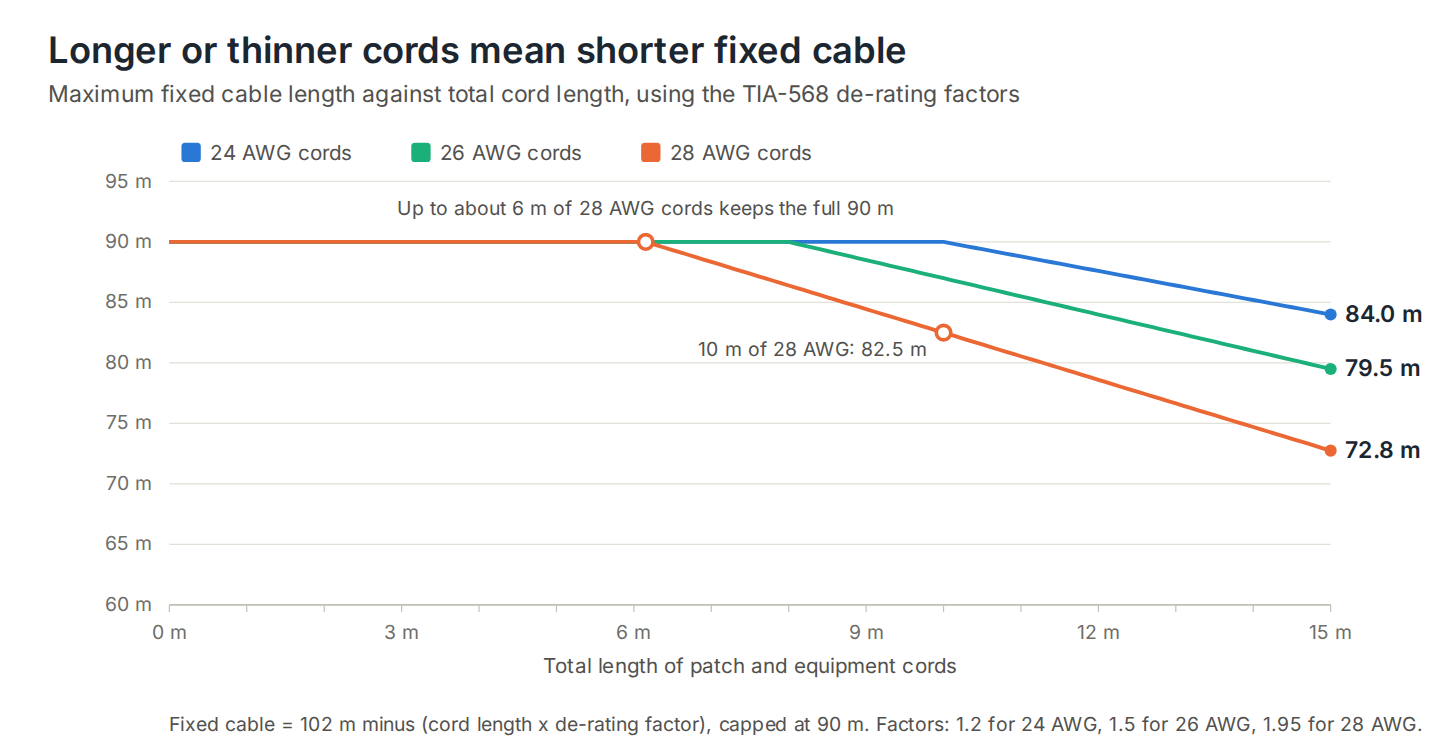
TIA-568 gives de-rating factors for this. For 24 AWG cords, each extra metre of cord costs 1.2 m of fixed cable. For 26 AWG it’s 1.5 m, and for 28 AWG it’s 1.95 m. With 28 AWG cords, about 6 m in total still leaves the full 90 m, but 10 m of them limits the fixed cable to 82.5 m. TIA also recommends keeping 28 AWG cords in a channel under 15 m in total, to stay within the DC resistance limit.
Slim cords are worth it in a dense cabinet. DTECH 28AWG Cat6 patch leads have a 3.8 mm jacket, pass Fluke patch lead testing to ISO/IEC 11801 Class E, and support PoE++ at lengths up to 6 m. Keep the total cord length in the channel to about 6 m and you lose nothing from the fixed run. For the difference between cord and installation cable, see solid vs stranded copper data cable.
Heat
Cable loses more signal as it gets warmer, and the length limits assume 20 °C. ISO/IEC 11801 asks for the fixed cable length to be reduced above that: by 0.4% per °C for unscreened cable up to 40 °C, 0.6% per °C from 40 to 60 °C, and 0.2% per °C for screened cable.
| Cable run at | Unscreened (U/UTP) | Screened (F/UTP, U/FTP) |
|---|---|---|
| 20 °C | 90 m | 90 m |
| 30 °C | 86.4 m | 88.2 m |
| 40 °C | 82.8 m | 86.4 m |
Warm ceiling voids, plant rooms and large PoE bundles are where this bites. Screened cable loses less length in the heat, which is one more reason to choose it for hot or crowded routes. Cable shielding explained covers the screen types.
Cable that isn’t pure copper
Copper-clad aluminium (CCA) has higher resistance and higher loss than pure copper, so it can fail a 90 m link that pure copper would pass, and it runs hotter under PoE. It isn’t recognised by the cabling standards. Why CCA data cable fails explains why.
PoE and cable length
Power over Ethernet doesn’t shorten the limit. Every IEEE PoE type is specified over a 100 m channel, and the power budget already allows for what the cable loses. A Type 4 (PoE++) switch port supplies 90 W so that at least 71.3 W reaches the device at the far end of 100 m.
What does change is heat. Current warms the cable, and bundles of PoE cables warm each other, which brings the temperature de-rating above into play. PoE vs PoE+ vs PoE++ and the BS 7671 Amendment 4 guide cover the current and heat limits.
What happens if you go over 100 m
A run a few metres over 100 m will often still connect, which is why overlong runs get installed. But it is outside the standard. The link may drop to a lower speed, pick up errors under load, or fail when the cable warms up or the PoE load rises. It will fail certification, so it can’t be handed over as compliant cabling.
Going past 100 m
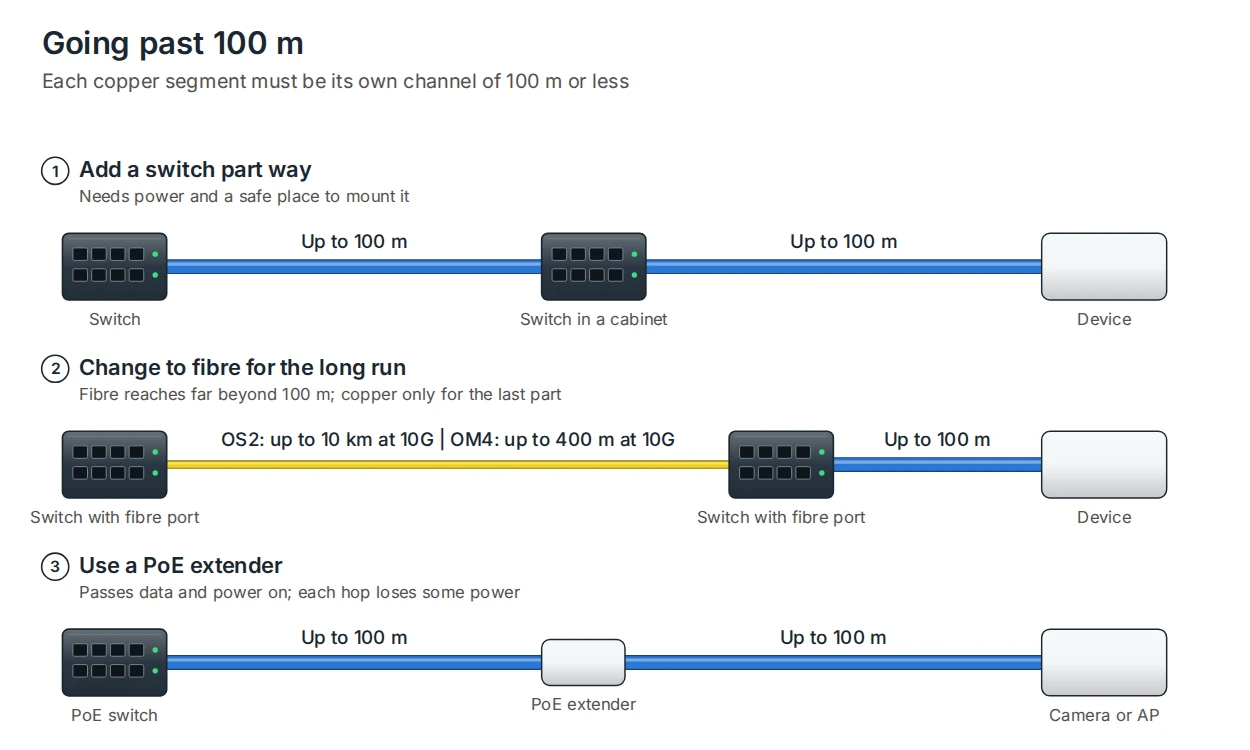
- Add a switch part way. Each copper segment becomes its own 100 m channel. It needs power and somewhere safe to mount it, such as a small wall cabinet.
- Use fibre for the long run. Fibre reaches far beyond copper: 400 m at 10 Gb/s on OM4 multimode, and 10 km on OS2 singlemode. Copper then covers only the last 100 m to the device. Fibre vs copper explains when to make the switch, and pre-terminated fibre arrives ready to plug in.
- Use a PoE extender. An extender sits between two runs of up to 100 m each and passes data and power on. Each hop uses some of the power budget, so check what reaches the device.
Between buildings, fibre is the right answer for another reason too: fibre with no metal in it doesn’t connect the two buildings’ earthing systems. For a run outside, use external-grade cable for the copper part, as covered in internal vs external data cable.
Frequently asked questions
Is the 100 m limit including patch cords?
Yes. 100 m is the whole channel, from switch port to device, including the patch cords at both ends. The fixed cable can be up to 90 m, leaving up to 10 m for cords.
Can Cat6 run 100 metres?
Yes, for 1 Gb/s, 2.5 Gb/s, 5 Gb/s and PoE, Cat6 supports the full 100 m channel. DTECH Cat6 is tested to 500MHz and carries 10GBase-T to 90m.
Does Cat6A or Cat8 go further than Cat5e?
No. Cat5e, Cat6 and Cat6A are all limited to a 100 m channel. Cat8 is specified for a 30 m channel at 25 and 40 Gb/s.
Can I run 120 m of Ethernet cable?
Not within the standards. It may connect, but it can drop speed or fail under load and won’t pass certification. Add a switch or extender, or use fibre.
Does PoE reduce the maximum length?
No. PoE is specified over the full 100 m channel. Large bundles of PoE cables do run warmer, which reduces the allowed fixed length in the same way as a hot ceiling void.
Summary
The maximum Ethernet cable length is a 100 m channel: up to 90 m of fixed cable and up to 10 m of cords. A better category doesn’t add distance. Longer or thinner patch cords, heat and CCA cable all shorten the real limit, and past 100 m the answer is a switch, an extender or fibre. DTECH supplies the installation cable and patch leads for a compliant channel.
If you need help planning cable runs or specifying the right cable for a long route, get in touch with the DTECH team.