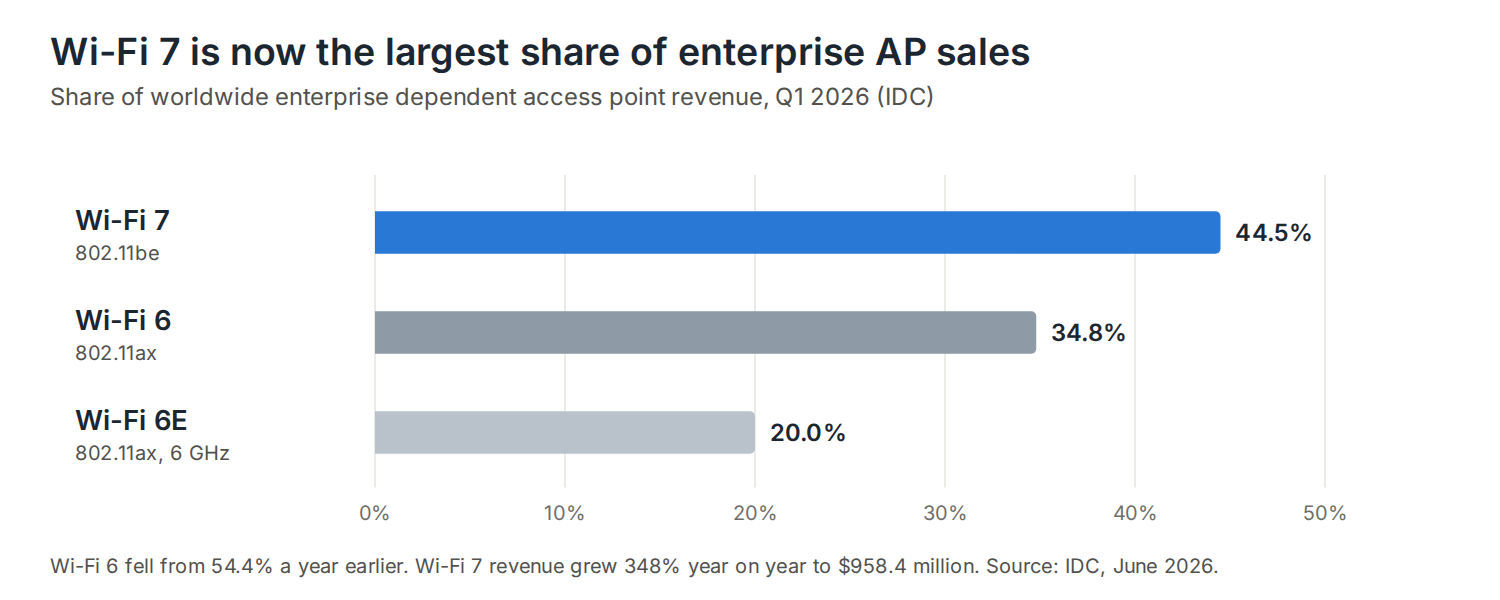
Wi-Fi 7 has taken over enterprise wireless faster than any generation before it. According to IDC, Wi-Fi 7 made up 44.5% of worldwide enterprise access point revenue in the first quarter of 2026, with revenue up 348% on a year earlier. Wi-Fi 6 fell from 54.4% to 34.8% over the same year. Meanwhile Wi-Fi 8 is on the way, with the first pre-standard products already announced.
For anyone planning an access point refresh, the cabling question matters more than the AP itself. Access points get replaced every few years; the cable in the ceiling is meant to last through several generations. This guide covers what Wi-Fi 7 and Wi-Fi 8 need from the cabling, and how to get it right first time.
What Wi-Fi 7 changes for the cable
Wi-Fi 7 (802.11be) adds 320 MHz channels in the 6 GHz band, 4096-QAM and multi-link operation, which lets a device use more than one band at once. The result is far more wireless capacity per access point, and two knock-on effects for the cabling.
- Faster uplinks. A single 1 Gb/s port can’t carry what a busy Wi-Fi 7 AP can deliver. Enterprise Wi-Fi 7 APs typically have 2.5, 5 or 10 Gb/s uplinks.
- More power. Tri-band APs with more radios draw more power. Many enterprise Wi-Fi 7 APs need more than the 25.5 W that PoE+ delivers at the device, so they need a PoE++ (802.3bt) switch port; some run with reduced features on PoE+.
Wi-Fi 8: reliability, not more speed
Wi-Fi 8 (IEEE 802.11bn) is still in draft. Final approval is expected in 2028, with Wi-Fi Alliance certification from late 2027 or early 2028. Products are arriving early: TP-Link announced a pre-standard Wi-Fi 8 router on 1 September 2026, built to a draft that could still change.
Unlike earlier generations, Wi-Fi 8 doesn’t raise the peak data rate. Its goals are about reliability: 25% more throughput at a given signal quality, 25% lower latency at the 95th percentile, and 25% fewer lost packets, particularly when devices move between access points. That’s good news for cabling. A ceiling cabled properly for Wi-Fi 7 uplinks and power is likely to suit Wi-Fi 8 APs too.
Uplink speed and the cable it needs
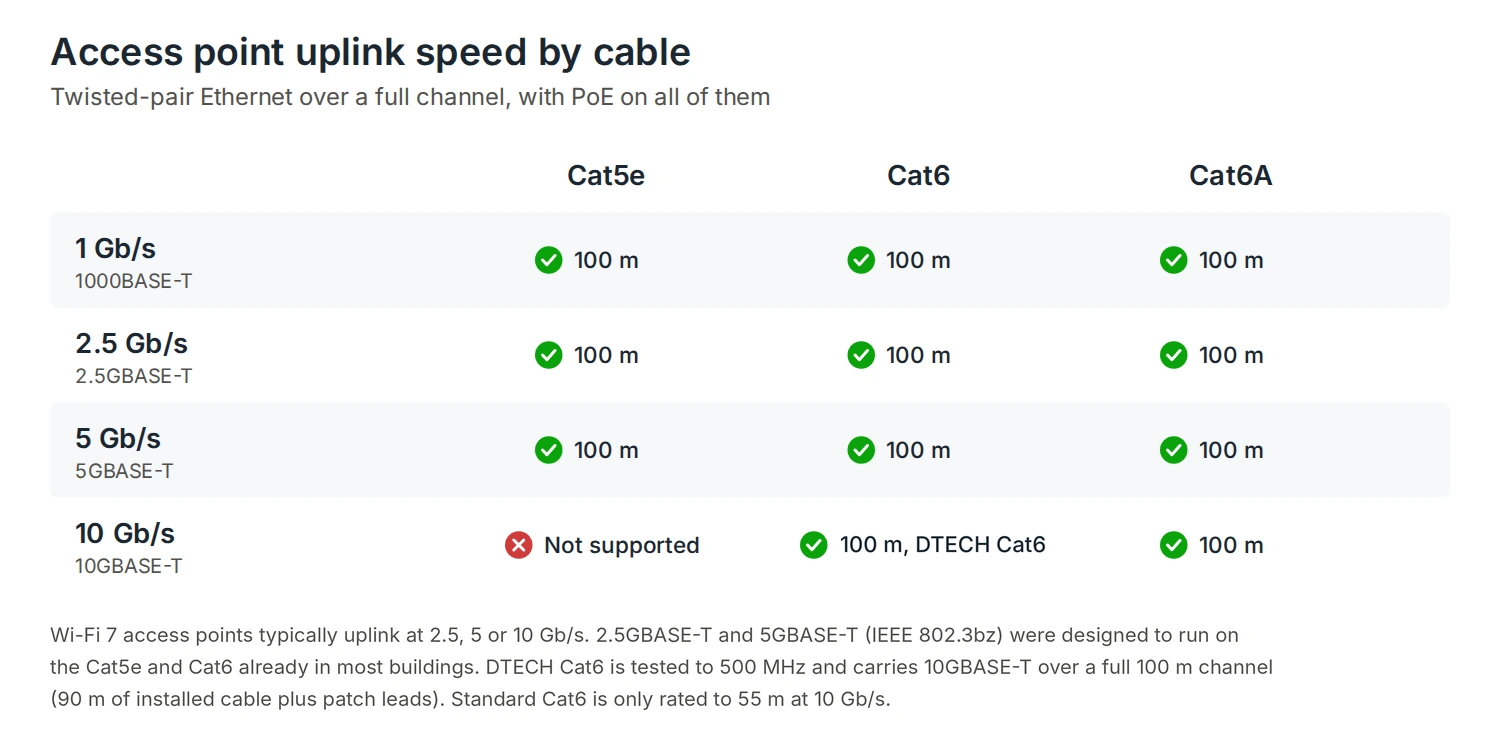
The 2.5 Gb/s and 5 Gb/s Ethernet standards (IEEE 802.3bz) were written for exactly this job: getting multi-gigabit access points onto the Cat5e and Cat6 already in buildings, over the full 100 m channel. If existing cable tests well, a refresh to 2.5 or 5 Gb/s APs may not need new cable at all.
For new cabling, DTECH Cat6 is tested to 500 MHz and carries 10GBASE-T over a 90 m permanent link within the full 100 m channel, as well as PoE++, so it covers 2.5, 5 and 10 Gb/s uplinks at full length. Standard Cat6 is only rated to 55 m at 10 Gb/s. DTECH Cat6A carries 10 Gb/s with more headroom, and TIA’s wireless cabling bulletin, TSB-162, recommends Category 6A or higher for new AP cabling. Choose Cat6A where 10 Gb/s headroom matters or where the specification calls for it. Cat5e vs Cat6 vs Cat6A compares the categories.
Power over Ethernet for Wi-Fi 7
Check each AP’s datasheet for its PoE type and the power it draws with every radio running, then check the switch: both the PoE type on each port and the total PoE budget across the switch. A switch that can power a few PoE++ APs may not be able to power all of them at once.
PoE++ doesn’t call for a cable upgrade. DTECH Cat6 and Cat6A both support PoE++, and every IEEE PoE type stays within the 750 mA per conductor that BS 7671 Amendment 4 sets for PoE. What matters more is pure copper and sensible bundle sizes, since bundles of powered cables run warmer. PoE vs PoE+ vs PoE++ covers the power levels.
Two drops to every access point
TIA TSB-162-B recommends at least two cable drops to each access point location. It’s an informative bulletin rather than a requirement, but the reasons are practical.
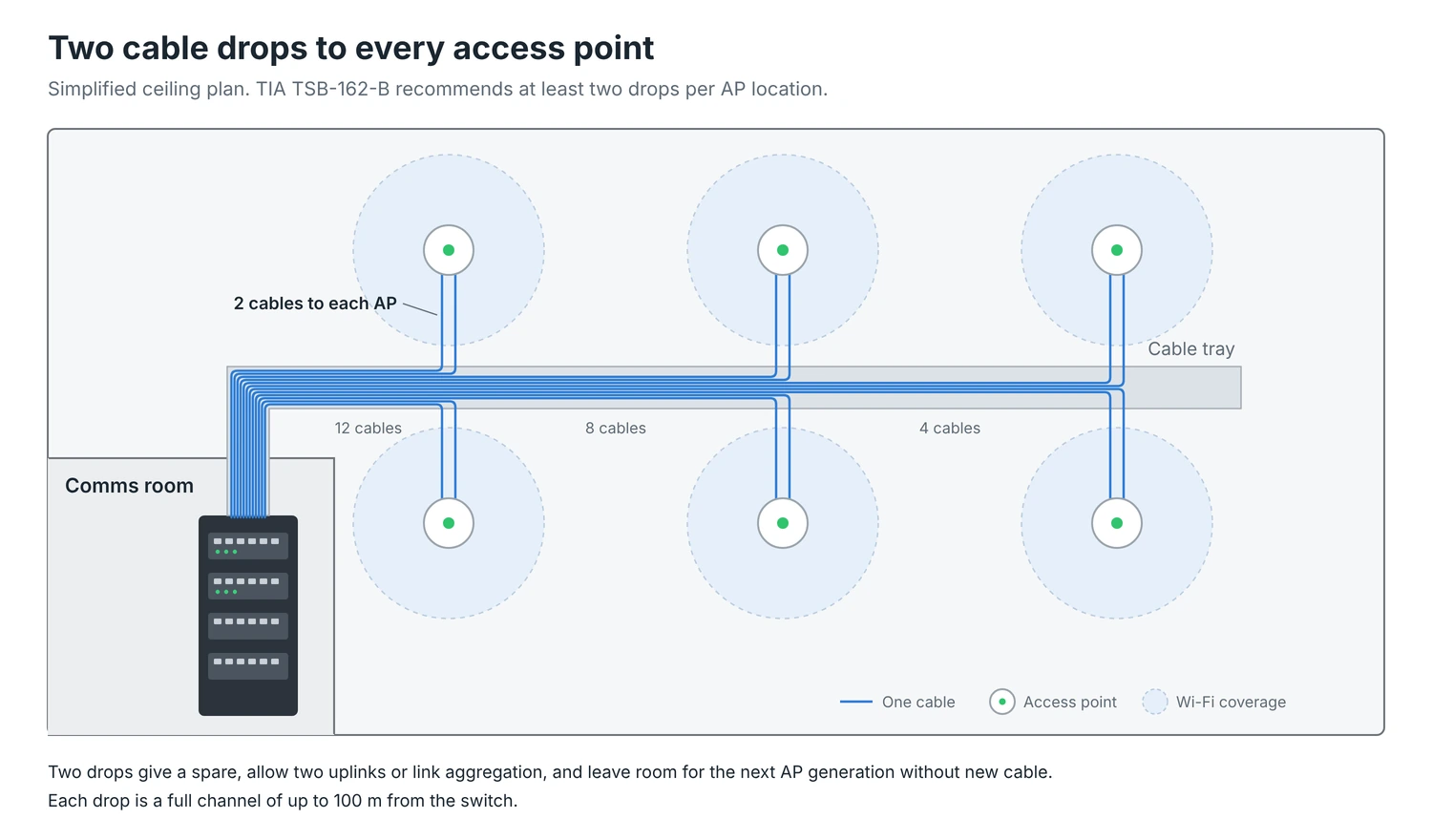
- A spare. If one cable or port fails, the AP can be moved to the other without opening the ceiling.
- Two uplinks. Some enterprise APs have two Ethernet ports, for redundancy or link aggregation.
- The next generation. The second drop costs little during installation and a lot to add later.
Each drop is a full channel of up to 100 m from the switch, so plan AP positions against comms room locations early. Terminate both drops at the AP location, on keystones in a surface box or ceiling outlet, and use short patch leads to the AP.
Patch leads at both ends
Patch leads complete every AP channel, and they carry the PoE too. DTECH 28AWG Cat6 slim patch leads save space in busy cabinets and support PoE++ at lengths up to 6 m. For screened Cat6A systems, DTECH Cat6A S/FTP slim patch leads keep the screen continuous to the switch.
What about fibre to the access point?
Some designers are looking at fibre for future APs that could outgrow 10 Gb/s copper. The catch is power: fibre can’t carry it, so each AP would need a local supply or a hybrid cable with copper power conductors. For Wi-Fi 7 and, on current plans, Wi-Fi 8, twisted-pair copper with PoE remains the practical way to connect access points. Fibre vs copper explains where each fits.
Access point refresh checklist
- Test existing cable before reusing it. Certification results show whether a link will carry 2.5, 5 or 10 Gb/s; how to read a cable test certificate explains them.
- Check every AP’s uplink speed and PoE type against the switch ports and total PoE budget.
- Install two drops per AP location on new cabling.
- Use pure copper data cable, Cat6 or Cat6A, and keep every channel within 100 m.
- Plan AP positions against comms room locations before the ceiling goes back.
Frequently asked questions
Does Wi-Fi 7 need Cat6A?
Not necessarily. Most Wi-Fi 7 APs uplink at 2.5, 5 or 10 Gb/s. Cat5e and Cat6 carry 2.5 and 5 Gb/s over 100 m, and DTECH Cat6 carries 10GBASE-T over a 90 m permanent link within the full 100 m channel. Cat6A adds more 10 Gb/s headroom and is what TIA TSB-162 recommends for new AP cabling.
Will Wi-Fi 8 need new cabling?
It isn’t expected to. Wi-Fi 8 focuses on reliability rather than peak speed, so cabling installed properly for Wi-Fi 7 is likely to suit it.
How much PoE does a Wi-Fi 7 access point need?
It varies by model. Many enterprise tri-band Wi-Fi 7 APs need more than PoE+’s 25.5 W at the device, so they need PoE++ (802.3bt) ports. Check the AP datasheet.
How many cables should go to each access point?
Two. TIA TSB-162-B recommends at least two drops per AP location, for a spare, dual uplinks and future upgrades.
When will Wi-Fi 8 be available?
Pre-standard products were announced in September 2026. The IEEE standard is expected to be approved in 2028, with Wi-Fi Alliance certification from late 2027 or early 2028.
Summary
Wi-Fi 7 is now the largest share of enterprise access point sales, and Wi-Fi 8 will follow from 2028 with better reliability rather than higher peak speeds. For an AP refresh, plan for multi-gigabit uplinks and PoE++, install two drops per AP, and use pure copper Cat6 or Cat6A within the 100 m channel. Cabling done that way should carry the next generation of access points too.
If you need help planning cabling for a wireless refresh, get in touch with the DTECH team.